How to keep your TikTok views private
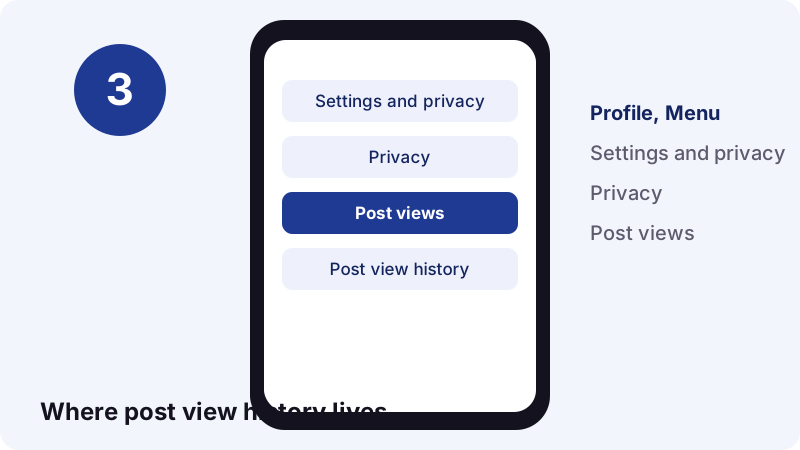
- Open Settings and privacy. In the TikTok app, tap Profile, then the Menu ☰ button, then Settings and privacy.
- Turn off post view history. Tap Privacy, then Post views, and switch Post view history off. Likes and comments still count as views to the creator.
- Turn off profile view history. Go back to Privacy, tap Profile views and switch Profile view history off. It is off by default.
- Remember stories are different. Watching a story always puts you on the creator's viewer list, even with a private account and both settings off.
Can you see who saved your TikTok? The short answer
No. TikTok's Help Center describes no screen that lists the accounts who saved or favorited a post. Saving a video to a phone happens on the viewer's side, and Favorites are a private collection.
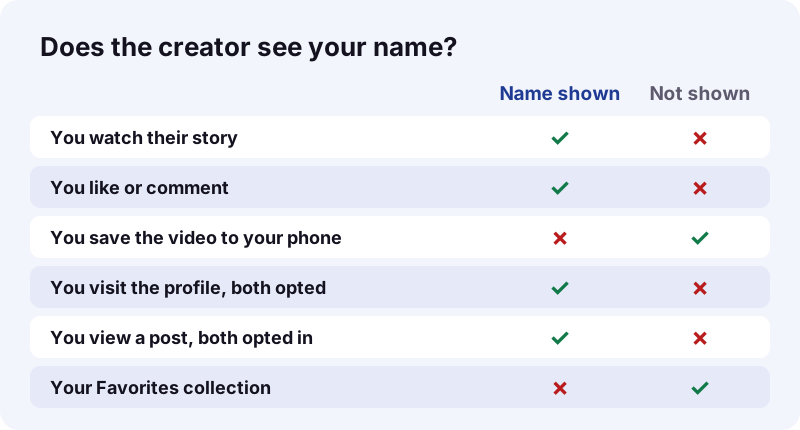
So if you were hoping to find out who saved your TikTok, the app will not tell you. It will tell you other things, and those are easy to mix up. The next sections go through each one.
What does TikTok show instead?
- Story viewers: a total and the accounts that watched.
- Post view history: some viewers of recent posts, if you turned it on.
- Profile view history: some visitors from the past 30 days, if you turned it on.
- Likes and comments: always public, always named.
- Analytics in TikTok Studio: performance data for your posts.
What does saving mean on TikTok?
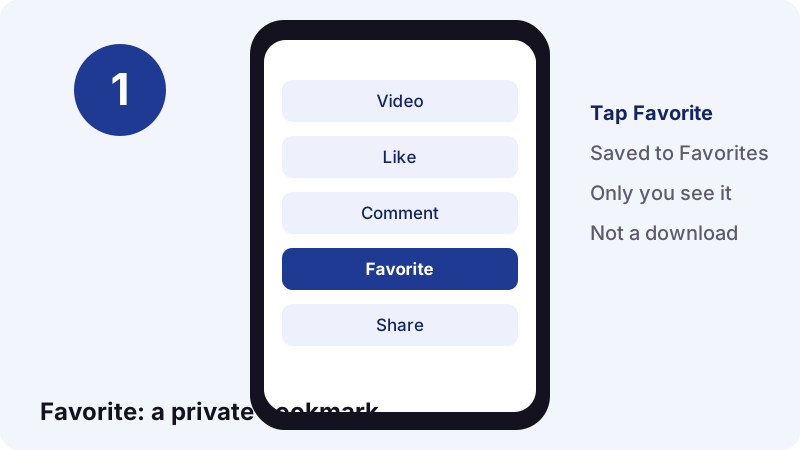
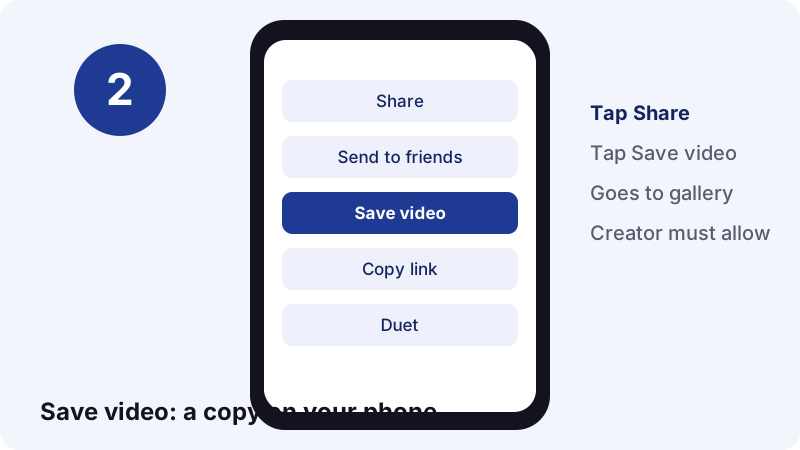
Two different buttons get called saving. Favorite bookmarks a post inside the app. Save video downloads a copy to your phone's gallery. Neither one, per TikTok Help, adds you to a list the creator can read.
| Action | Where it goes | Needs creator's OK? | Creator sees your name? |
|---|---|---|---|
| Favorite | Your private Favorites collection | No | No list described by TikTok |
| Save video | Your phone's gallery | Yes, downloads must be on | No list described by TikTok |
| Save with a web tool | Your Downloads folder | Post must be public | No account involved |
| Like | The post's like count | No | Yes |
| Comment | Under the post | Depends on comment settings | Yes |
Why do people mix the two up?
Because both feel like keeping a post. One keeps a pointer inside TikTok, so the post disappears from your Favorites if the creator deletes it. The other keeps an actual file, which stays on your phone no matter what happens to the original.
Can creators see who favorited their video?
Not as a named list, as far as TikTok documents it. The Help Center says your Favorites are visible to you alone.
“Favoriting content saves it to your private Favorites collection, so you can easily find, rewatch, or organize saved content whenever you want. Only you can see the content you have favorited.”
What about the Likes and Favorites filter?
TikTok's Notifications page lists a filter called Likes and Favorites under Activities in the inbox. It does not explain what each favorite entry shows. We will not guess, so treat favorites as possibly visible as activity, but not as a saved-by list.
Can creators see who downloaded their video?
No. When you tap Save video, the file goes to your own gallery. TikTok's pages on saving and downloads describe no record of who did it that the creator can open.
What the creator does control is whether downloads are possible at all. TikTok's saving guide says that if the save option is missing, the creator has turned downloading off. Private videos cannot be downloaded.
“If the video downloads setting was previously on and you turned it off, any of your videos or photos that were downloaded when the setting was on will stay on another person's device.”
In plain words: switching downloads off works going forward, not backward. A copy someone already saved stays on their phone.
So what can creators actually see?
Named viewers in three places, each with rules: story viewers, post view history and profile view history. Plus likes and comments, which were never private.
| Signal | Shows names? | Conditions |
|---|---|---|
| Story viewers | Yes, plus a total | Anyone who watched, even from a private account |
| Post view history | Yes | Viewer and creator both opted in; viewer follows the creator; posts from the last 7 days |
| Post views via likes or comments | Yes | Applies even if the viewer has the setting off |
| Profile view history | Yes | Both opted in; visits in the past 30 days |
| Saves to Favorites | No list described | Collection is private |
| Downloads to a phone | No list described | Creator only controls on/off |
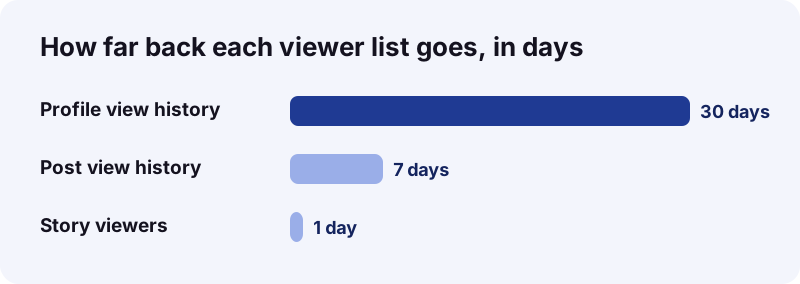
The time windows differ a lot. A profile visit stays on the list for 30 days. Post views only cover posts from the last 7 days. A story lives 24 hours.
How does post view history work?
It is an opt-in feature that names some of the people who viewed your recent posts. It only works both ways: you see others only if they also have it on.
“Post view history allows you to see who has viewed your posts and keeps you informed about viewer engagement.”
Who shows up in it?
- Followers who turned post view history on and watched your post.
- Non-followers who liked or commented, whatever their setting.
- Only views of posts made in the last 7 days.
Who can use it?
Only people aged 16 or older with fewer than 5,000 followers. Big accounts do not get it at all. TikTok also notes that story view history is separate and is not affected by this setting.
Can people see that you watched their story?
Yes, always. Stories are the one place where viewing is never anonymous inside the app. A private account does not hide you, and neither does turning off profile view history.
“You can see the total number of Story views you receive, as well as the accounts that watched it.”
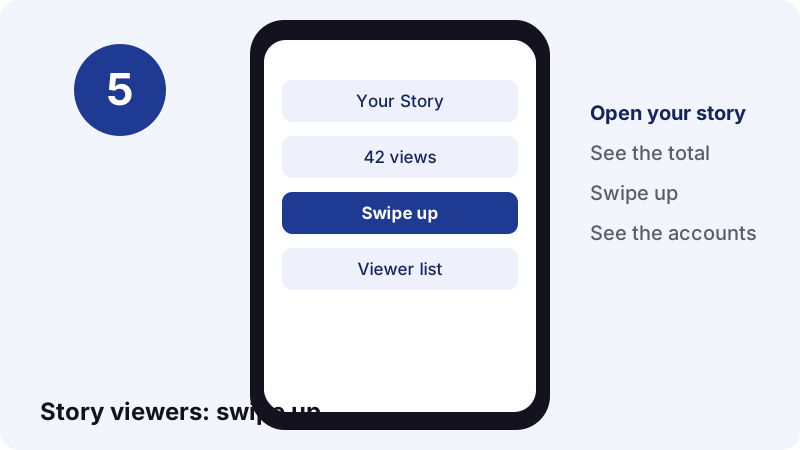
TikTok's Watching Stories page says it plainly: people can see you viewed their story even when your account is private or profile view history is off. If you want to keep a public story, our TikTok story saver fetches it without your account, but opening it in the app first still counts as a view.
Does a Highlight work the same way?
A Highlight is a story the creator pinned to the profile. TikTok says its visibility matches the original story's settings. The help pages do not say more about Highlight viewer lists, so we will not either.
Does profile view history reveal your visits?
Only if both of you turned it on. It is off by default, and switching it off means you stop seeing visitors and they stop seeing you.
- Covers visits from the past 30 days.
- Needs the setting on for the visitor and the profile owner.
- Only for users 16+ with fewer than 5,000 followers.
- Can be changed from Settings, from your inbox or from your profile.
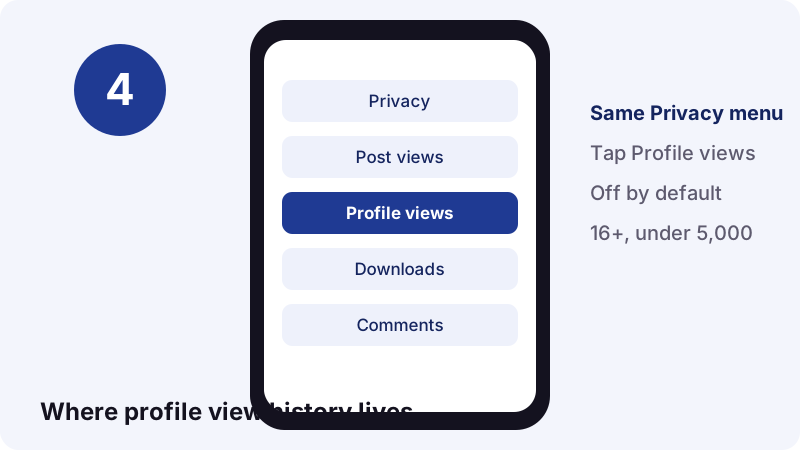
Source: TikTok's Profile view history page. Note that this is about visiting a profile, not about saving anything from it.
What does TikTok Analytics tell creators?
Performance numbers, not names. TikTok calls Analytics a free tool for content performance, audience demographics and engagement trends, opened from TikTok Studio.
- Tap Profile at the bottom.
- Tap the Menu ☰ button and pick TikTok Studio.
- Tap Analytics in the Posts tab.
TikTok's Analytics help page adds two caveats: the feature is not available to everyone yet, and data can lag by a few days. It describes no list of people who saved a post.
What should you read in Analytics instead?
Look at trends, not individuals. If a post does far better than your usual ones, it was probably useful enough to keep. Make more of that. Chasing the names behind each save is a dead end, because TikTok does not publish them.
How do you browse TikTok without being seen?
Turn off post view history and profile view history, and skip stories you do not want to appear on. That covers every named-view list TikTok documents.
| What you do | Setting that hides you | Still visible? |
|---|---|---|
| View a post | Post view history off | Yes, if you like or comment |
| Visit a profile | Profile view history off | No |
| Watch a story | None | Yes, always |
| Favorite a post | None needed | Collection is private |
| Save a public video | None needed | No named list |
Even with post view history off, TikTok says your likes and comments on others' posts still appear as views to them.
Creators: how do you stop people saving your posts?
Switch off Video downloads, or make the account private. You cannot see who saved, but you can decide whether saving is possible.
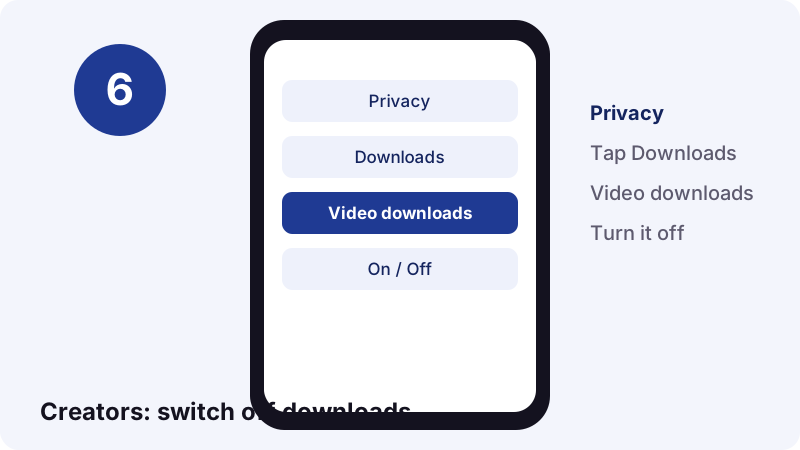
- Tap Profile, then Menu ☰.
- Tap Settings and privacy.
- Tap Privacy, then Downloads.
- Turn Video downloads off.
Per TikTok's private vs public account page, nobody can download, Duet or Stitch posts from a private account. Accounts of users under 16 have downloads off by default too.
Can anyone still copy a public post?
TikTok notes that others can still share your content through a link or messages. And any screen can be recorded: Apple documents a built-in screen recorder on iPhone. Copyright law, not a setting, is the real protection.
Do web downloaders tell the creator?
A tool like Tiktokioo.com does not log in to TikTok, so there is no account of yours attached to the fetch. It only reads public posts, the same way a logged-out browser does.
- Videos: the TikTok video downloader gives an MP4 without the logo.
- Sounds: TikTok to MP3 pulls just the audio.
- Photo posts: the slideshow downloader grabs every image.
- Stories: the story saver keeps a public story past 24 hours.
If TikTok does not serve a file to the public, we cannot get it. Private posts, drafts and expired stories are out of reach. Tiktokioo.com is an independent tool and is not affiliated with tiktokio.com, TikTok or ByteDance.
Beware of apps that promise to show who saved your TikTok
Be careful with any app or site that claims it can reveal who saved your posts. TikTok documents no such data, so a third party has nothing real to read it from.
- Never type your TikTok password into an outside site.
- Skip anything that asks for a login to show a saved-by list.
- Check TikTok's own Help Center first; features it does not describe usually do not exist.
TikTok is a large target: it reported 1 billion users in September 2021, and over 100 million monthly active users in the United States by early 2022, according to Wikipedia. Scams follow audiences that size.
Saving responsibly
Nobody gets a list, but the rules still apply. Save your own posts freely. For someone else's work, keep it for personal viewing, or ask before you reuse it.
The U.S. Copyright Office explains fair use as a case-by-case test with four factors, such as the purpose of the use and its market effect. A repost that replaces the original is a much harder case than a private copy. Removing a reshare you made? See how to delete a repost on TikTok.
Frequently asked questions
Can you see who saved your TikTok?
No. TikTok's Help Center describes no list of people who saved or favorited a post. Your Favorites collection is private, and Save video downloads to the viewer's own phone.
Does TikTok notify you when someone saves your video?
TikTok's help pages do not describe a notification that names who downloaded a video. The inbox does have a Likes and Favorites filter, but TikTok does not explain what each favorite entry shows.
Can people see my Favorites?
No. TikTok says only you can see the content you have favorited.
Can someone see that I watched their TikTok?
Only through post view history: you both need it on, you follow them, and the post is from the last 7 days. Liking or commenting shows up as a view regardless.
Can people see that I viewed their story?
Yes. Story owners see the accounts that watched, even if your account is private or your profile view history is off.
Can someone see that I visited their profile?
Only if you both have profile view history on. It covers the past 30 days and is off by default.
Why can't I use post view history?
It is only for users 16 or older with fewer than 5,000 followers.
How do I stop people from saving my TikToks?
Go to Settings and privacy, Privacy, Downloads, and turn Video downloads off. A private account also blocks downloads. Copies saved earlier stay on people's devices.
Does saving a TikTok with Tiktokioo.com notify the creator?
Tiktokioo.com does not use your TikTok account, so the save is not linked to you. It only works on public posts.
Are there apps that show who saved your TikTok?
TikTok documents no such data, so treat those claims with suspicion and never hand over your password.
Guides
Video Downloader — Paste a link, get the MP4 without the TikTok logo.
Sources
- Favoriting content on TikTok — TikTok Help Center
- How to save TikTok videos to your device — TikTok Help Center
- Manage video downloads — TikTok Help Center
- TikTok post view history — TikTok Help Center
- Profile view history — TikTok Help Center
- TikTok Stories — TikTok Help Center
- Watching Stories on TikTok — TikTok Help Center
- How to use TikTok Analytics — TikTok Help Center
- Notifications — TikTok Help Center
- TikTok — Wikipedia