How to save a TikTok sound as audio
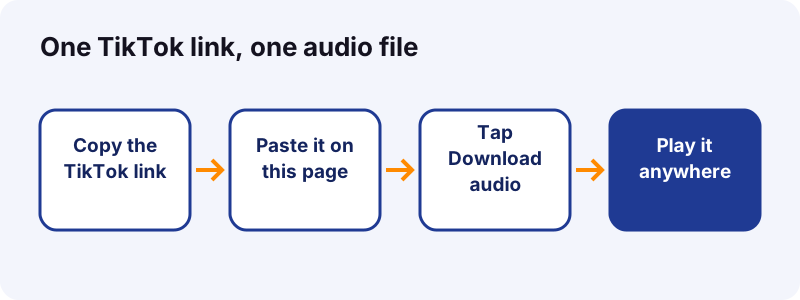
- Copy the post link. In TikTok, open the post that plays the sound you want. Tap Share, then Copy link.
- Paste it here. Open this page, tap the box at the top and paste. On most browsers the Paste button does it for you.
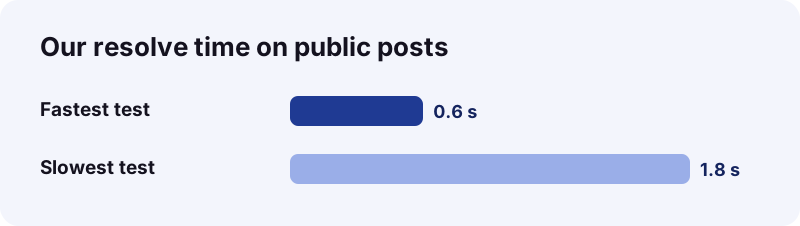
- Tap Download. Wait a second or two while we read the post. Our tests on public posts took between 0.6 and 1.8 seconds.
- Save the audio file. Tap Download audio. The file is named after the post and ends in .m4a or .mp3, matching what TikTok stores.
What does the TikTok to MP3 tool give you?
It gives you the sound of a public TikTok post as its own audio file. You paste a link, we ask TikTok for that post, and you download the track that plays under the clip. No video, no picture, just audio.
The file comes straight from TikTok's own CDN. We do not touch the bytes, so what you hear is what TikTok plays.
What can you do with the file?
- Listen offline on a walk or a flight.
- Keep a voice memo, a recipe or a lesson you posted yourself.
- Drop your own original sound into a video editor.
- Back up a sound before you delete an old post.
Saving a whole clip instead? Use the TikTok video downloader. For picture posts, the slideshow downloader saves each image. Every tool on the site is listed here:
How do you convert TikTok to MP3 in three taps?
Copy the post link, paste it here, and tap Download audio. That is the full TikTok to MP3 routine on a phone, a tablet or a computer.
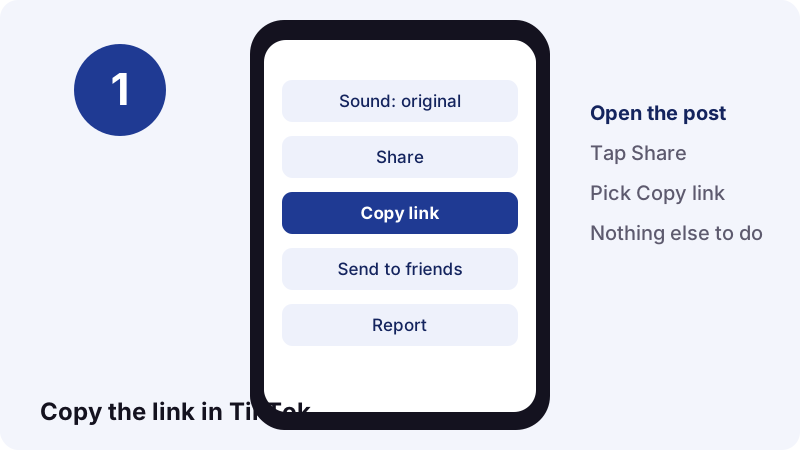
Step 1: copy the link
Open the post in the TikTok app or on tiktok.com. Tap Share, then Copy link. A short vm.tiktok.com link works just as well as a long one.
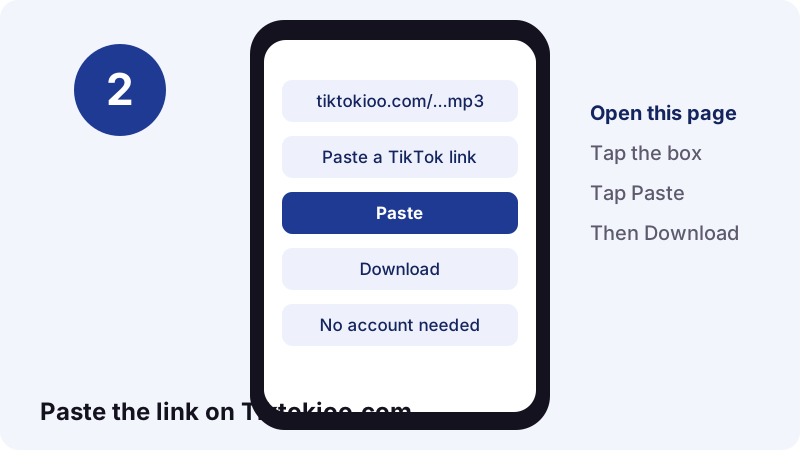
Step 2: paste it on this page
Come back here and tap the box at the top. Tap Paste, or long-press the box and choose Paste. Then tap Download.
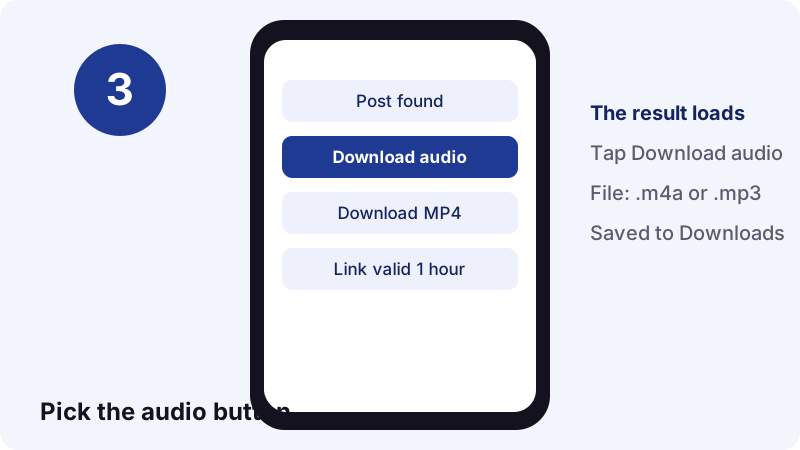
Step 3: save the audio
When the post loads, tap Download audio. The link stays valid for one hour. After that, paste the TikTok link again to get a fresh one.
- Copy link in TikTok.
- Paste on Tiktokioo.com.
- Tap Download audio.
- Open the file from Downloads.
Why does the file sometimes end in .m4a?
Because many TikTok sounds are stored as AAC audio inside an MP4 box, and that combination uses the .m4a extension. We keep the real format instead of faking an .mp3 label.
Wikipedia's MP4 article notes that audio-only MPEG-4 files generally carry the .m4a extension. When TikTok serves an MP3 stream, your file ends in .mp3. When it serves AAC, it ends in .m4a.
“AAC was designed to be the successor of the MP3 format (MPEG-2 Audio Layer III) and generally achieves higher sound quality than MP3 at the same bit rate.”
So is an .m4a a worse result?
No. At the same bit rate, AAC usually sounds a little better than MP3. Renaming the file would not change a single sample; converting it would only add a second round of lossy compression.
- .m4a = AAC audio in an MPEG-4 container.
- .mp3 = MPEG-1 or MPEG-2 Audio Layer III.
- .m4r = the same AAC audio, used for iPhone ringtones.
Which format plays on which device?
Both play on every phone and computer sold in recent years. MP3 still wins on very old gadgets, while M4A is the native audio type on Apple devices.
| Device or app | .m4a (AAC) | .mp3 |
|---|---|---|
| iPhone and iPad | Yes | Yes |
| Android phones | Yes | Yes |
| VLC on any computer | Yes | Yes |
| Windows Media Player | Yes | Yes |
| In-dash car audio | Many models | Almost all |
| Very old MP3 players | Often no | Yes |
If one specific player refuses the .m4a, convert a copy (see below). For everything else, keep the original.
Key dates for the two formats
- MP3 was published as ISO/IEC 11172-3 in 1993.
- AAC became an MPEG standard in April 1997.
- MP3 became substantially patent-free in the US on 16 April 2017.
How fast is it, and how big are the files?
It is quick and the files are tiny. In our tests, reading a public post took 0.6 to 1.8 seconds, and a 15-second sound came out at about 0.25 MB as M4A.
That 0.25 MB works out to roughly 133 kbit/s. Using the same rate, here is what longer sounds should weigh. Only the first row is a direct measurement.
| Sound length | Approx. size | How we got it |
|---|---|---|
| 15 seconds | 0.25 MB | Measured |
| 30 seconds | 0.5 MB | Same rate, doubled |
| 1 minute | 1 MB | Same rate, x4 |
| 3 minutes | 3 MB | Same rate, x12 |
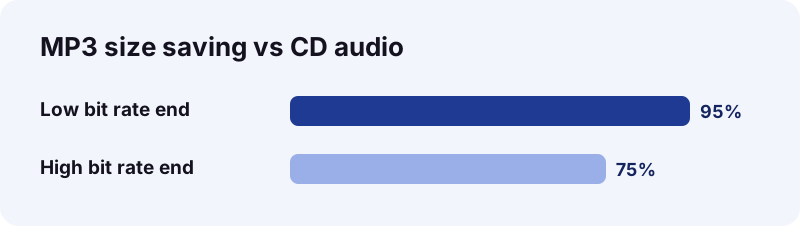
For scale: Wikipedia says MP3 compression commonly cuts size by 75 to 95% compared with CD audio. A full phone of TikTok sounds is hard to reach.
Where does the audio file go after you tap Download?
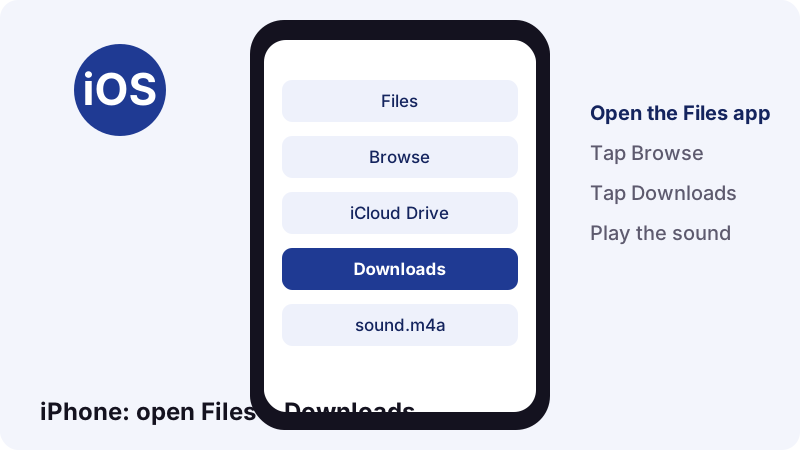
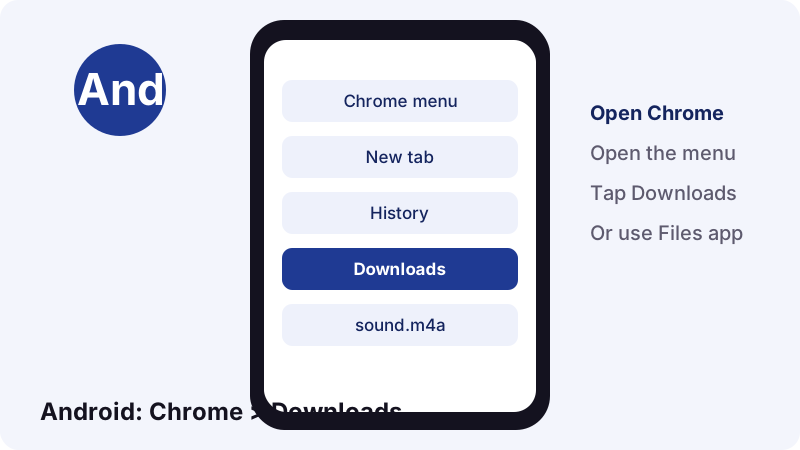
It goes to your browser's normal download folder. On iPhone that is Files > Downloads, on Android it is the Downloads list in Chrome or the Files app, and on a computer it is the Downloads folder.
On iPhone or iPad
Apple's guide says to open the Files app, tap Browse, then tap Downloads. If the folder is missing, look under iCloud Drive. Safari's download list also shows recent files. See Apple's Files guide.
On Android
Google's Chrome help says downloaded files are listed in the Files app, and in Chrome under the menu's Downloads entry. Tap the sound to play it.
On Windows or Mac
The file lands in Downloads unless you picked another folder. For a step-by-step on a Mac, read our Mac download guide; the audio steps are the same.
When should you convert the audio to a real MP3?
Only when a specific app or device refuses .m4a. Otherwise, the original file is better: same quality, smaller size, and no extra work.
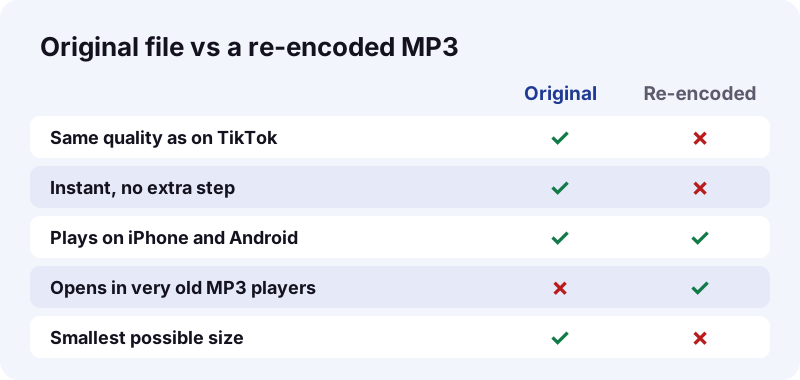
If you must convert, work on a copy. Open it in any audio editor you trust, export as MP3 and pick 128 kbit/s or higher. Wikipedia notes that 128 kbit/s is a common MP3 rate with an 11:1 compression ratio.
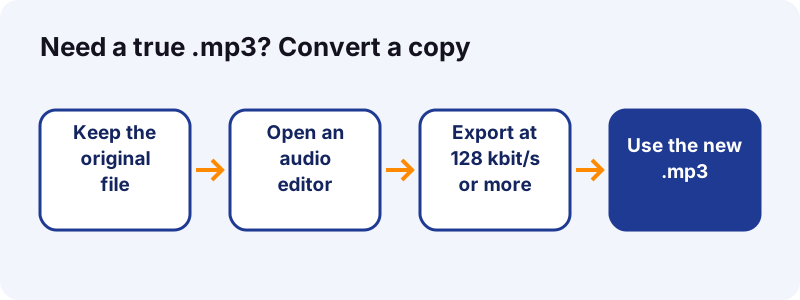
Mistakes to avoid when converting
- Exporting below the original bit rate. It only throws detail away.
- Converting the same file twice. Each pass adds loss.
- Deleting the original. Keep it as your master copy.
- Online converters that ask for an account or an app install.
Why not just screen-record the sound?
Because a screen recording is a video, not an audio file. It picks up taps and alerts, starts late, ends late, and weighs far more than a clean 0.25 MB sound.
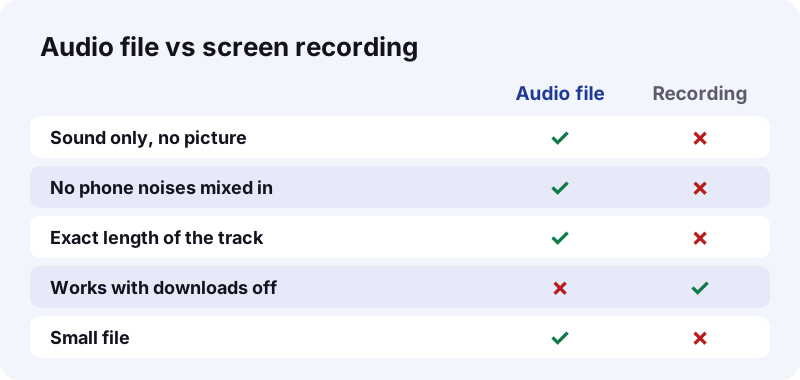
A recording does have one use: it still works when a creator has turned downloads off. In that case, ask the creator first, since the setting is a clear sign of their wishes.
- Audio file: clean, exact, small.
- Screen recording: noisy, padded, large.
- Best choice for your own posts: the audio file.
Which TikTok links can you paste?
Any link that opens a public post works. That covers app share links, browser links and short links.
| Link you paste | Works? | What you get |
|---|---|---|
| tiktok.com/@user/video/… | Yes | Video post sound |
| vm.tiktok.com/… short link | Yes | Same, after redirect |
| tiktok.com/@user/photo/… | Yes | Slideshow sound |
| A profile link (@user) | No | Paste one post |
| A sound page (/music/…) | No | Paste a post using it |
| Private or deleted post | No | Nothing to read |
Want the pictures of a photo post too? Paste the same link into the TikTok slideshow downloader. For 24-hour posts, use the story saver.
Sound only or the whole clip: which page do you need?
Use the TikTok to MP3 page when you only want the sound. Use the video downloader when you want the clip, and the other two tools for photos and stories.
| You want | Best page | File you get |
|---|---|---|
| Only the sound | This audio page | .m4a or .mp3 |
| The clip without the logo | Video downloader | MP4 |
| Every picture of a photo post | Slideshow downloader | JPEG images + audio |
| A 24-hour story | Story saver | MP4 or JPEG |
All four share the same rules: public posts only, no account, and links that expire after one hour. You can paste one link into several pages if you need both the clip and the sound.
A common combo: save the clip with the TikTok downloader for your archive, then run the same link through TikTok to MP3 for a light audio copy you can play in the car.
What stops a TikTok sound from downloading?
Usually a privacy or download setting on the creator's side. No TikTok to MP3 tool can bypass it: if TikTok does not serve the file to the public, we cannot get it either.
- The post is private, friends-only or deleted.
- The post is blocked in the region our server reads from.
- It is a draft, which never left the creator's phone.
- The sound was muted or removed after a copyright claim.
- The link points to a profile or a sound page, not a post.
TikTok's help page explains that when the downloads setting is off, people cannot download that creator's videos or photos. It is off by default for private accounts and users under 16.
Quick fixes to try
- Open the link in a private browser tab to check it is public.
- Copy the link again from the Share menu.
- Wait a minute and retry; TikTok sometimes rate-limits.
- Try a different post that uses the same sound.
Can you reuse a TikTok sound legally?
You can always reuse sounds you made yourself. Music by others is still owned by its rights holders, so personal listening is one thing and posting it elsewhere is another.
“If you have a Business Account, you cannot use music on TikTok that's not licensed for commercial use.”
In the US, fair use is judged case by case. The Copyright Office lists four factors courts weigh:
- The purpose and character of the use, including commercial use.
- The nature of the copyrighted work.
- How much of the work is used.
- The effect on the market for the original.
When in doubt, ask the creator or use your own original sound. To report misuse of your work on this site, see our DMCA page.
How should you name and store saved sounds?
Rename each file the moment you save it, and keep a single folder for them. Ten seconds of effort now saves a long search later.
- Name it
creator - topic - date.m4a. - Keep originals in one folder and converted copies in another.
- Note the post link in the file name or a text file, so you can credit it.
- Back up the folder with your usual cloud or computer backup.
Is Tiktokioo.com safe and private?
Yes. There is no account, no app and no extension. We do not keep your files: download links expire after one hour and nothing is stored on our side.
- No sign-up or login, ever.
- Files come from TikTok's own servers.
- No install on your phone or computer.
- Independent site, not affiliated with TikTok or ByteDance.
Read the full privacy policy and the terms of use, or learn who runs Tiktokioo.com.
Frequently asked questions
Is this TikTok to MP3 tool free?
Yes. It is free, with no account and no daily cap on public posts.
Why did I get an .m4a and not an .mp3?
TikTok stored that sound as AAC audio. We hand you the real file, which uses the .m4a extension. It plays on iPhone, Android, Windows and Mac.
Does the audio lose quality?
No. We do not re-encode the sound, so the file is the same one TikTok plays in the app.
Can I save the sound of a TikTok slideshow?
Yes. Photo posts carry a sound too. Paste the link here for the audio, or use the slideshow downloader for the images and the audio together.
Can I get audio from a private TikTok?
No. Private, friends-only and deleted posts are not served to the public, so we cannot read them.
How long do the download links last?
One hour. After that, paste the TikTok link again to get a new download link.
Can I make a ringtone from a TikTok sound?
Yes, if it is your own sound or you have permission. iPhone ringtones use AAC audio with the .m4r extension, so the .m4a file is a natural starting point.
Does it work on a computer?
Yes. Paste the link in Chrome, Edge, Safari or Firefox and the audio file goes to your Downloads folder.
Will the creator know I saved their sound?
We do not send anything to TikTok's notifications. For what TikTok itself shows creators, read can you see who saved your TikTok.
Is Tiktokioo.com part of TikTok?
No. Tiktokioo.com is an independent tool and is not affiliated with tiktokio.com, TikTok or ByteDance.
Sources
- Sounds — TikTok Help Center
- Download content — TikTok Help Center
- Manage video downloads — TikTok Help Center
- MP3 — Wikipedia
- Advanced Audio Coding — Wikipedia
- MP4 file format — Wikipedia
- Find your downloaded files on iPhone — Apple Support
- Download a file (Android) — Google Chrome Help
- U.S. Copyright Office Fair Use Index — U.S. Copyright Office