How to download a TikTok slideshow
- Copy the photo post link. Open the slideshow in TikTok, tap Share, then Copy link.
- Paste it into the box. Come back to this page and paste the link in the box at the top, then tap Download.
- Check the slide list. Each slide appears as its own image, numbered in the order the creator posted them.
- Save the images you want. Tap a slide to save it as a JPEG. Tap Download audio if you also want the sound.
What is a TikTok slideshow downloader?
It is a tool that pulls the still images out of a TikTok photo post and gives them to you as normal picture files. A TikTok slideshow is not a video, so a video downloader alone is the wrong tool for it.
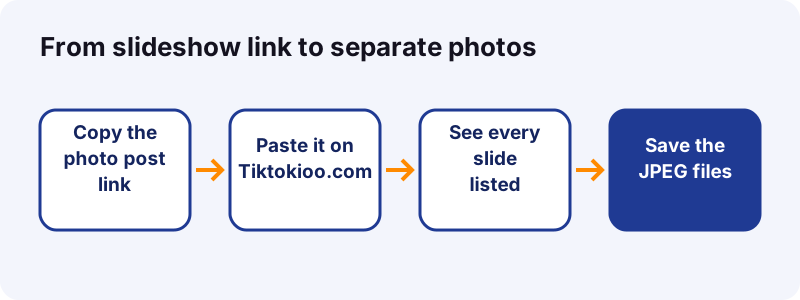
- Each slide becomes its own JPEG.
- Slides keep the order the creator chose.
- The sound comes as a separate audio file.
- No watermark of our own is added.
Tiktokioo.com has one page for each job. Pick the one that matches your post:
How do you download a TikTok slideshow step by step?
Copy the link of the photo post, paste it here, and save the slides you want. It takes about as long as reading this paragraph.
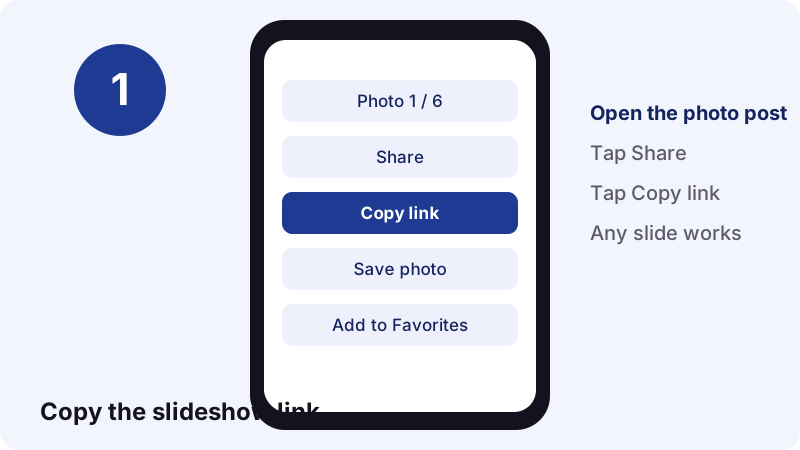
Copy the link from any slide
In TikTok, tap Share on the post, then Copy link. It does not matter which slide is on screen; the link points to the whole post.
- App link: tiktok.com/@name/photo/…
- Short link: vm.tiktok.com/…
- Both work the same way.
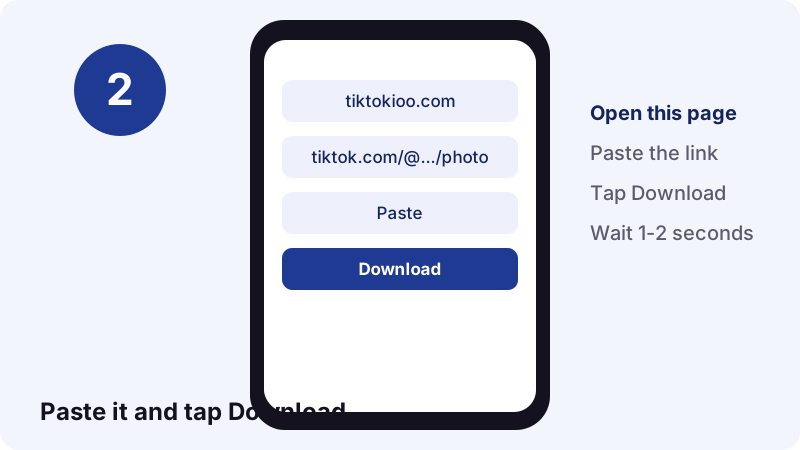
Paste and wait a moment
Paste the link into the box at the top of this page and tap Download. In our tests a public post took between 0.6 and 1.8 seconds to read.
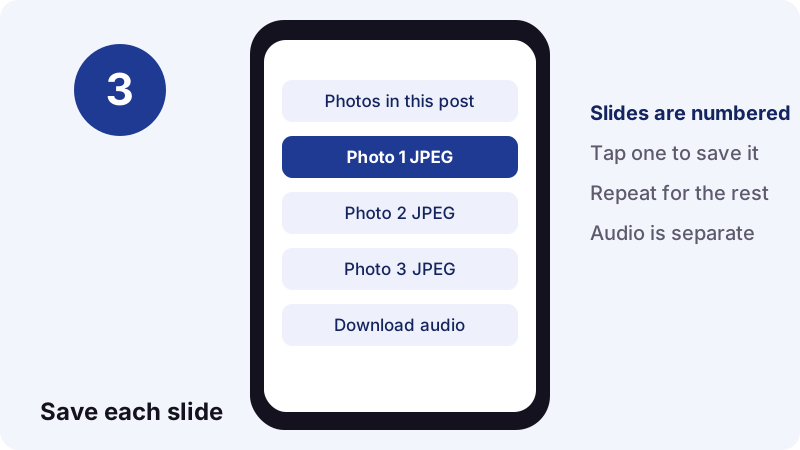
Save the slides one by one
The result lists every photo in order. Tap each one to save it. The files are numbered _1, _2, _3 and so on, so they sort correctly in any folder.
- Tap Photo 1 and save it.
- Repeat for each slide you want.
- Tap Download audio for the sound.
- Open your Downloads folder to check.
What files do you get from a photo post?
You get one JPEG per slide and the sound as an audio file. You do not get an MP4, because TikTok does not store one for photo posts: our resolver returns images and audio only.
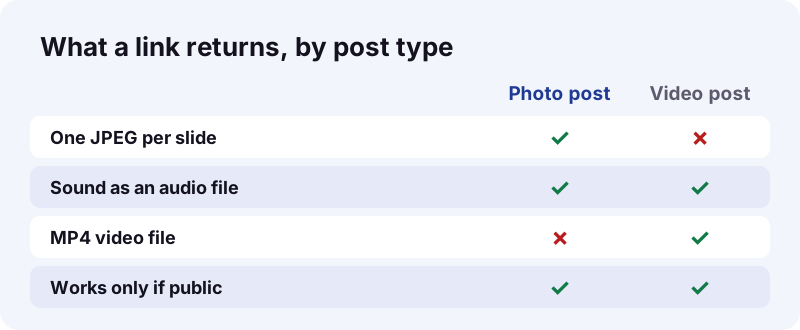
- Images: JPEG, one per slide.
- Sound: .m4a or .mp3, as TikTok stores it.
- Video: none for photo posts.
Want the slideshow as a moving clip? You can rebuild it yourself from these files. See the video section further down.
Which photo post links can you paste?
Any link that opens a single public photo post. Share links from the app, short links and browser links all work, because each one points to one post ID.
| Link you paste | Works? | Tip |
|---|---|---|
| tiktok.com/@user/photo/… | Yes | The normal photo post link |
| vm.tiktok.com/… short link | Yes | We follow the redirect |
| tiktok.com/@user/video/… | Video post | Use the video downloader |
| tiktok.com/@user (profile) | No | Open one post and copy it |
| A private or deleted post | No | Not served to the public |
- One link = one post.
- Paste a new link for each slideshow.
- Links you get back expire after one hour.
Pasted a video by mistake? That is fine: the video downloader handles clips, and the audio page handles sounds. For a story that vanishes in 24 hours, use the story saver.
How big and how sharp are the slideshow images?
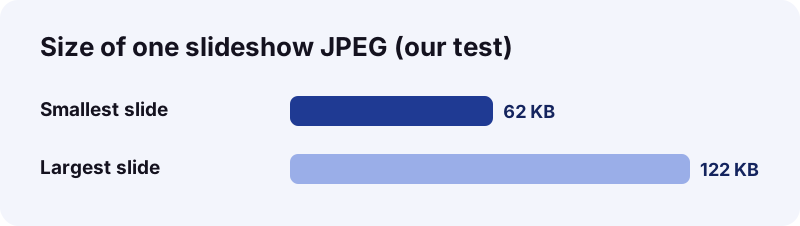
Sharp enough for a phone screen and light enough to save dozens. The slides we tested were 1080 x 1440 pixels and weighed between 62 KB and 122 KB each.
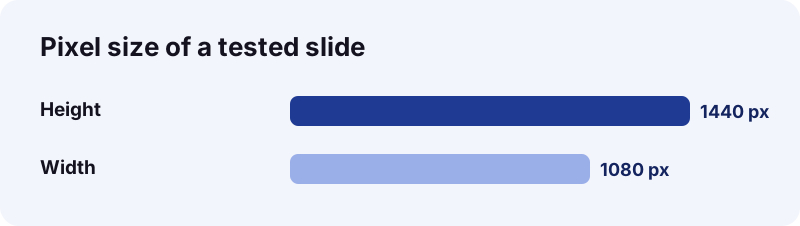
1080 x 1440 is a 3:4 portrait shape, about 1.56 megapixels. It is a tall portrait frame, made for phone screens.
| Slides in the post | Low estimate | High estimate |
|---|---|---|
| 1 slide | 62 KB | 122 KB |
| 5 slides | 0.3 MB | 0.6 MB |
| 10 slides | 0.6 MB | 1.2 MB |
| 20 slides | 1.2 MB | 2.4 MB |
- Busy photos with detail compress less.
- Plain backgrounds and text cards compress more.
- Sizes depend on what TikTok serves, not on us.
Why are the slides JPEG files?
Because JPEG is the format TikTok serves for these slides, and it opens on every device. We pass the file on as it is, without converting it.
“JPEG typically achieves 10:1 compression with a loss in image quality that, while perceptible, is widely agreed upon to be acceptable.”
Wikipedia dates the JPEG standard to 1992 and calls it the most widely used image format. That is why a slide saved here opens in any gallery, editor or browser.
What about HEIF on iPhone?
iPhones often take photos as HEIF, which Apple says compresses better than JPEG. Slides you download from TikTok are still JPEG, so there is nothing to convert before you share them.
| Format | Where you meet it | Opens everywhere? |
|---|---|---|
| JPEG (.jpg) | TikTok slideshow images | Yes |
| HEIF (.heic) | iPhone camera photos | Needs iOS 11 or macOS High Sierra and later on Apple devices |
- No conversion needed.
- No quality loss from our side.
- Ready to post, print or edit.
Where do the images land on an iPhone?
In the Files app, inside the Downloads folder. Apple's guide says to open Files, tap Browse, then Downloads; if you do not see it, look in iCloud Drive.
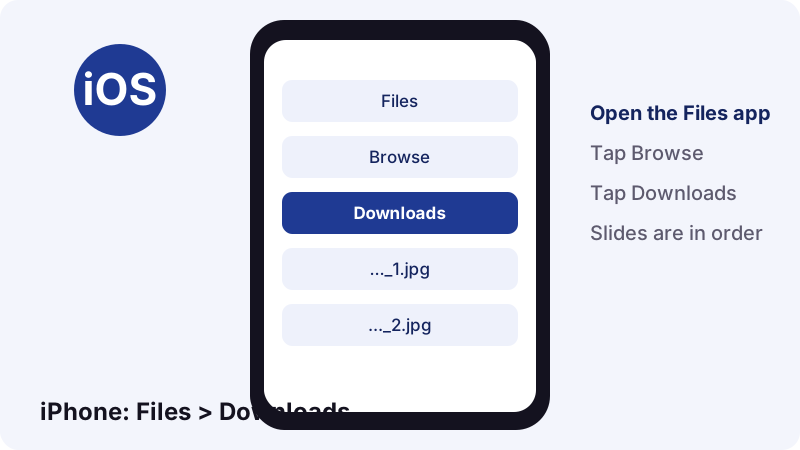
- Open the Files app.
- Tap Browse at the bottom.
- Tap Downloads.
- Tap a slide to view it.
How do you send a slide to a friend?
To pass a slide on, Apple says to touch and hold the file in Files, tap Share, and pick AirDrop, Messages or Mail.
- Safari's download list also shows recent files.
- Numbered names keep the slides in order.
Where do the images land on Android?
In your Downloads. Google's Chrome help says you can find every downloaded file in the Files app, or in Chrome's own Downloads list from the menu.
- Open Chrome's menu.
- Tap Downloads.
- Tap a slide to open it.
What if Chrome opens the image instead?
If a slide opens full screen in Chrome instead of saving, touch and hold the image and tap Download image. Google lists that exact option in its help page.
- Files app: your downloads.
- Chrome: menu, then Downloads.
- Screenshots, by contrast, go to Photos > Collections > On this device > Screenshots, per Google's Android help.
Does it work on a laptop or desktop?
Yes. Paste the link in any desktop browser and the JPEGs go to your Downloads folder, ready for an editor or a print shop.
- Windows: File Explorer, Downloads.
- Mac: Finder, Downloads.
A big screen also makes it easier to check each slide before you save it. Mac users can follow our Mac download guide; the steps for photo posts match.
Which browser should you use?
Any current desktop browser works. The page needs JavaScript turned on, and that is all.
- Chrome or Edge on Windows.
- Safari or Chrome on a Mac.
- Firefox on any system.
How do you get the music from a TikTok slideshow?
Tap Download audio on the same result screen. Photo posts carry a sound like any video, and our resolver returns it next to the images.
- The sound file is separate from the images.
- It keeps TikTok's own format, often .m4a.
- A 15-second sound weighed about 0.25 MB in our tests.
- Paste the photo post link.
- Wait for the slide list.
- Tap Download audio.
Need only the sound and no images? The TikTok to MP3 page does exactly that. For video posts, use the TikTok video downloader instead.
Isn't TikTok's own Save photo button enough?
Sometimes. TikTok's app lets you save the photos of a post when the creator allows downloads. A web downloader helps when you are on a computer or simply want named files in a folder.
“If there are multiple photos, tap Select all to download all of the photos or select which ones you'd like to download.”
TikTok describes the in-app route like this:
- Open the photo post in the TikTok app.
- Tap Share.
- Tap Save photo, then Select all or pick slides.
- Tap Save.
| TikTok's Save photo | Tiktokioo.com | |
|---|---|---|
| Where it runs | TikTok app (per TikTok Help) | Any browser |
| Save all slides at once | Yes, Select all | One by one |
| Sound as a separate file | Not described | Yes |
| Respects creator settings | Yes | Yes |
- Use the app button when you are already in TikTok on your phone.
- Use this page for a computer, a folder of numbered files, or the audio.
What blocks a slideshow from loading?
Most often because the post is not public or the creator turned downloads off. If TikTok does not serve the images, we cannot get them.
- The account is private.
- The post was deleted or hidden.
- It is still a draft.
- The post is blocked in our server's region.
- You pasted a profile link, not a post link.
TikTok's help page says that when a creator turns the downloads setting off, people cannot download videos or photos already posted or posted later. The setting is off by default for private accounts and users under 16.
- Creator turns downloads off: nobody can save the photos.
- Creator turns it back on: saving works again.
- Photos saved earlier stay on the devices that saved them.
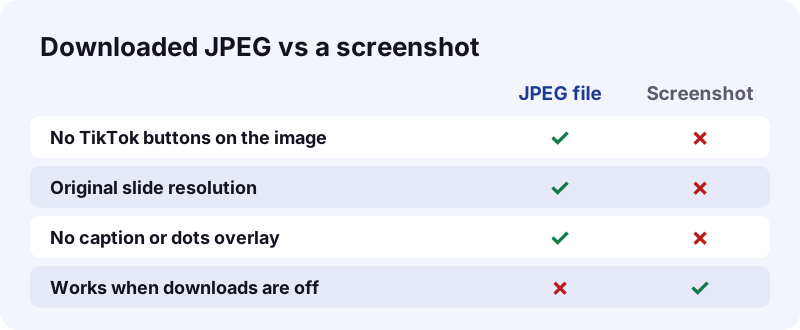
What to try first
- Open the link in a private tab to check it is public.
- Copy the link again from Share.
- Retry after a minute.
Can you turn a TikTok slideshow back into a video?
Yes, with any video editor. Save all the JPEGs and the sound, place them on a timeline in order, and export an MP4.
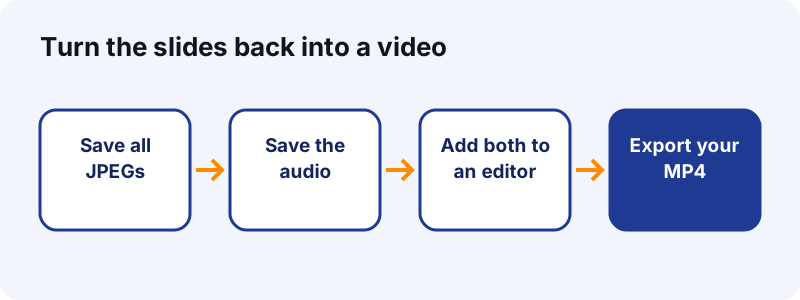
- Download every slide and the audio.
- Import them into your editor.
- Set a duration per slide, for example 2 to 3 seconds.
- Lay the sound underneath and export.
Do this only with your own posts or with the creator's permission. A rebuilt video of someone else's photos is still their work.
How long should each slide stay on screen?
Match the pace to the content. Text-heavy slides need more time than simple photos.
- Photos only: about 2 seconds each.
- Slides with short text: about 3 seconds.
- Dense text or recipes: 4 seconds or more.
Can you reuse photos from someone else's post?
Saving your own photos is always fine. Photos by other people stay theirs, so keep downloads for personal viewing unless you have permission.
In the US, the Copyright Office says fair use is decided case by case, with no fixed number of copies or images that is automatically safe. Courts weigh four factors:
- Why you use the work, and whether it is commercial.
- What kind of work it is.
- How much of it you use.
- Whether your use hurts the original's market.
- Ask the creator before reposting.
- Credit the account when you share with permission.
- To report misuse of your work, see our DMCA page.
When is saving clearly fine?
- The slideshow is your own post.
- The creator told you yes, in writing if possible.
- You keep the images private, for your own viewing.
Does it cost anything, and what do we keep?
Yes. There is no account and no install, and nothing is stored on our servers. Download links expire after one hour.
What do we never ask for?
- A TikTok login or password.
- An email address or phone number.
- An app or browser extension install.
- Any payment.
- Free, with no sign-up.
- Images come from TikTok's own CDN.
- Independent site, not affiliated with TikTok or ByteDance.
TikTok is big, which is why tools like this exist: Wikipedia reports close to 800 million monthly active users in July 2020, and over 100 million in the US in early 2022.
Details are in our privacy policy and terms. You can also read about Tiktokioo.com or save a 24-hour post with the story saver.
Frequently asked questions
How do I download all the photos of a TikTok slideshow?
Paste the post link on this page and tap Download. Every slide is listed as a JPEG; tap each one to save it.
Can I save a TikTok slideshow as a video?
Not directly, because TikTok stores photo posts as images plus a sound, with no MP4. Save the JPEGs and the audio, then join them in a video editor.
What resolution are the images?
The slides we tested were 1080 x 1440 pixels JPEG files of 62 to 122 KB. Other posts can differ.
Do you add a watermark to the photos?
No. We add nothing to the slides. You get the image files TikTok serves for the post.
Can I get the song from a photo post?
Yes. Tap Download audio on the result, or use the TikTok to MP3 page if you only need the sound.
Does it work with private slideshows?
No. Private, friends-only and deleted posts are not public, so we cannot read them.
Why are some slides missing?
We list the images TikTok returns for the post. If the creator removed a slide or TikTok did not serve it, it cannot appear.
Does the creator get notified?
We send nothing to TikTok's notifications. For what TikTok shows creators, see can you see who saved your TikTok.
Do I need an app?
No. It runs in Safari, Chrome, Edge or Firefox on a phone, tablet or computer.
Is Tiktokioo.com run by TikTok?
No. Tiktokioo.com is an independent tool and is not affiliated with tiktokio.com, TikTok or ByteDance.
Sources
- Download content — TikTok Help Center
- Manage video downloads — TikTok Help Center
- JPEG — Wikipedia
- TikTok — Wikipedia
- Using HEIF or HEVC media on Apple devices — Apple Support
- Find your downloaded files on iPhone — Apple Support
- Send files from the Files app on iPhone — Apple Support
- Download a file (Android) — Google Chrome Help
- Take a screenshot or record your screen on your Android device — Android Help
- U.S. Copyright Office Fair Use Index — U.S. Copyright Office