How to save a public TikTok story with Tiktokioo.com
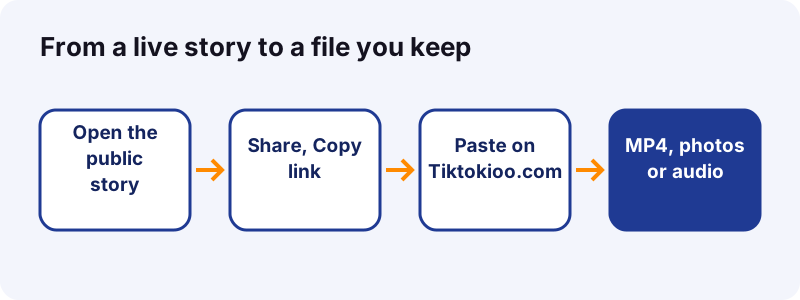
- Open the story while it is live. Find the public story on the creator's profile, in your inbox or in the Following or For You feed.
- Copy its link. Tap Share, then Copy link. On a computer, you can copy the address from the browser bar.
- Paste it here. Paste the link into the box at the top of this page and tap Download. Our server reads a public link in 0.6 to 1.8 seconds.
- Pick a file. Choose the MP4, the HD copy, the photos or the audio. Each link works for 1 hour.
- Find it on your device. On iPhone, open Files and then Downloads. On Android, open the Files app. On a computer, open your Downloads folder.
Save a TikTok story in under a minute
Copy the story link, paste it in the box above, tap Download. That is the whole job. The TikTok story saver returns the same files TikTok streams to every viewer: a video, a set of photos, or a sound.
You do not sign in. You do not install anything. The tool works on a phone, a tablet or a computer, and it is free.
Tiktokioo.com is an independent tool. It is not affiliated with tiktokio.com, TikTok or ByteDance.
What is a TikTok story, exactly?
A story is a photo, video or text post that stays up for 24 hours and then drops off the feeds. People can reply to it with a message or react with an emoji.
“TikTok Stories allow you to share photos and videos that stay visible for 24 hours. Your Stories can be viewed from your profile, inbox, and the For You and Following feeds.”
That short window is why people look for a way to keep one. A recipe, a quick tutorial, a friend's trip clip: once the day is over, you cannot scroll back to it unless the creator added it to a Highlight.
Where do stories show up?
- On the creator's profile, as a ring around the profile photo.
- In your inbox.
- At the top of the Following feed.
- Inside the For You feed, mixed with regular posts.
What files do you get from a story?
You get whatever TikTok serves for that story. A video story gives you an MP4. A photo story gives you the images. Almost every story with sound also gives you an audio file.
| Story type | What you can save | Typical format |
|---|---|---|
| Video story | The clip without the TikTok logo, plus an HD copy when TikTok has one | MP4 (HD often H.265/HEVC) |
| Photo story | Each image in full size | JPG or WEBP, as served |
| Story with music | The sound on its own | M4A or MP3 |
| Text story | Only what TikTok serves as an image or video | Depends on the post |
A 15-second sound comes out at about 0.25 MB as M4A in our tests, so audio files are tiny. Want only the music? The TikTok to MP3 converter is built for that.
How do you find the link to a story?
Open the story and tap Share. If Copy link is in the menu, tap it. The link is now on your clipboard.
TikTok's sharing help page describes the same Share button for posts. On a story, it sits at the bottom of the screen.
What does a story link look like?
- A short link such as
vm.tiktok.com/…orvt.tiktok.com/…. - A full address with
/video/or/photo/and a long ID number. - Both kinds work. Our server follows the short link for you.
No Copy link in the menu?
Update the TikTok app first; labels move between versions. Still missing? The story may not be public, and then there is no link we can open.
How do you save a TikTok story on iPhone?
Use Safari. Copy the link in TikTok, paste it on Tiktokioo.com, then tap the file you want. Safari puts it in the Files app, not in Photos.
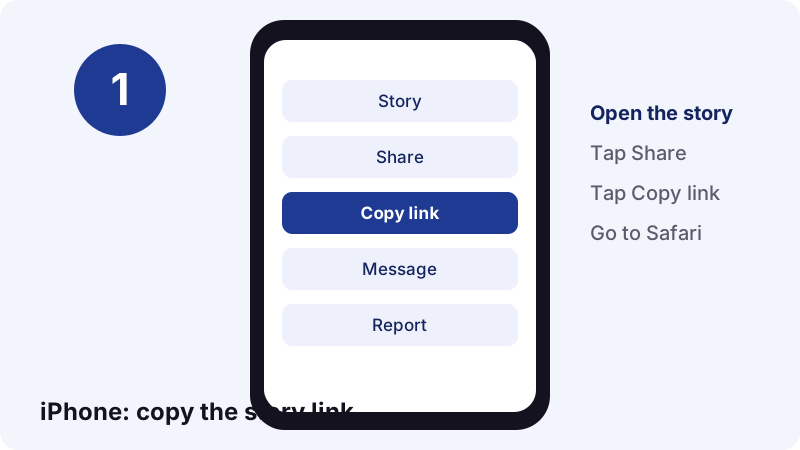
- In TikTok, open the story, tap Share, then Copy link.
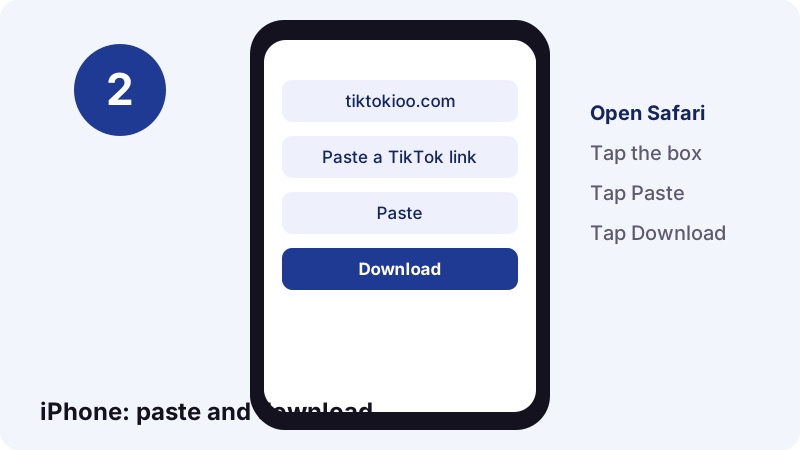
- Open Safari and go to tiktokioo.com.
- Tap the box, tap Paste, then Download.
- Tap MP4 and confirm the download.
- Open Files to find it.
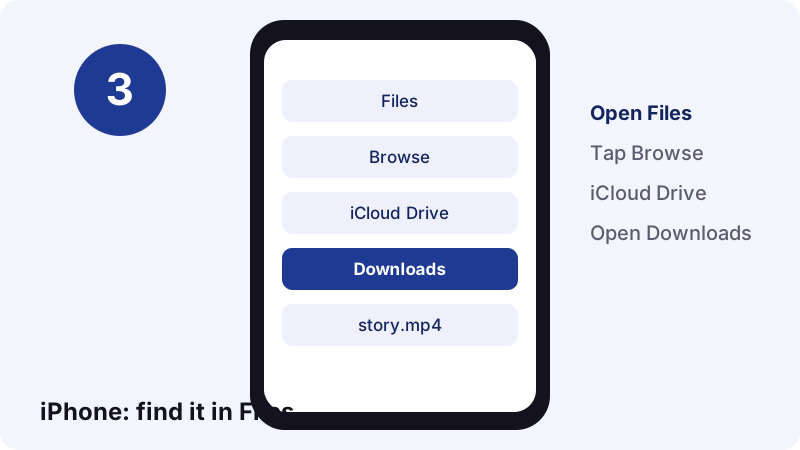
Apple's page on where to find downloads on iPhone or iPad gives the path: Files, Browse, iCloud Drive, Downloads. To move the clip to Photos, open it, tap Share, then Save Video.
How do you save a TikTok story on Android?
Copy the link, open Chrome, paste it on Tiktokioo.com and tap the MP4. Android saves it in your Downloads, which you can open from the Files app.
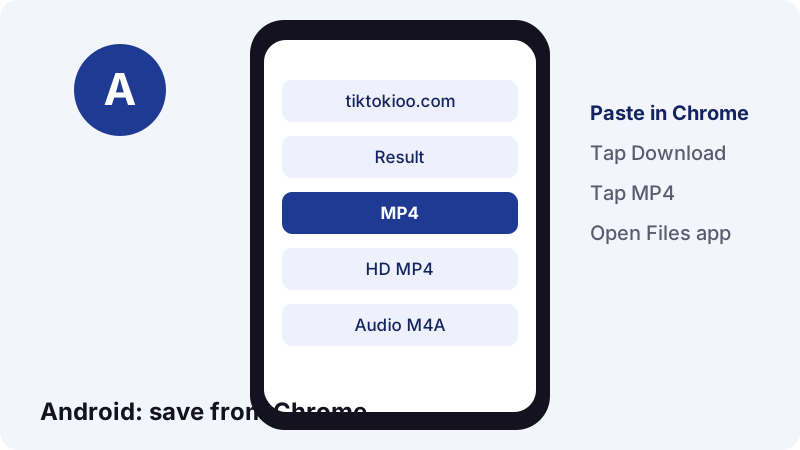
Google's help page on finding files on Android notes that the Files app can have a different name on some phones, depending on the maker.
Why does my gallery not show the clip?
- Some gallery apps scan new files with a delay. Open the Files app instead.
- Check the Downloads category, then sort by date.
- If the download stopped, go back and tap the file again. The link still works for up to 1 hour.
Can you save a TikTok story on a computer?
Yes. Open the story on tiktok.com, copy the address from the browser bar, paste it here and click Download. It works in any desktop browser.
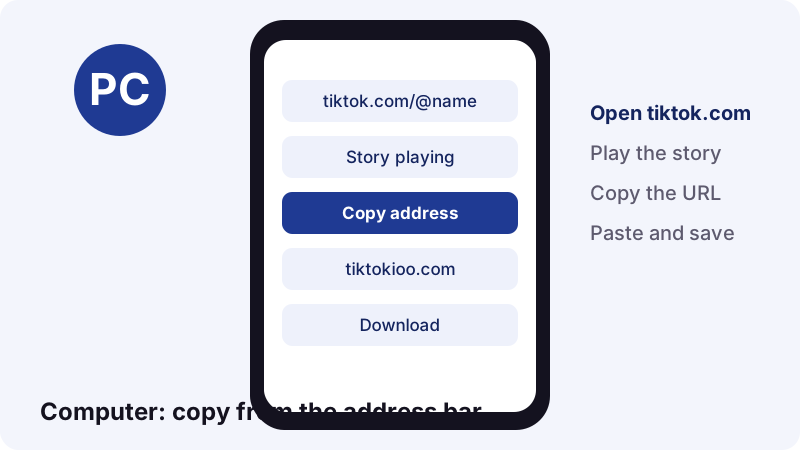
On Windows, the file goes to your Downloads folder. Microsoft's File Explorer guide says you can open it with the Windows logo key + E, and Downloads is pinned in Quick access by default from Windows 11 version 22H2.
On a Mac, the browser saves it to your Downloads folder. We have a full walk-through in how to download TikTok videos on Mac.
How long do you have before a story is gone?
You have up to 24 hours from the moment it was posted, and less if the creator deletes it early. Once it expires, the link stops working for everyone, including us.
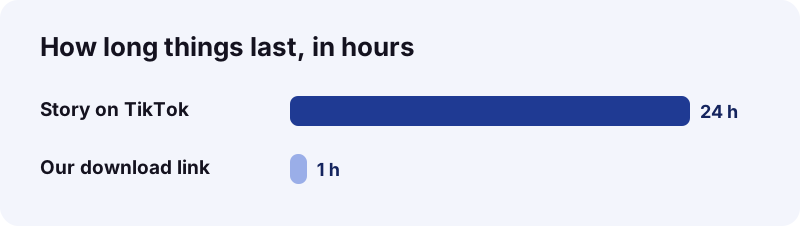
Two clocks matter here. TikTok gives the story 24 hours. Our download link gives you 1 hour after you press Download. If you wait too long on either, start again with a fresh link.
Can a creator delete a story before the 24 hours?
Yes. TikTok's Stories page explains that a creator can swipe up on their story and tap Delete. When they do, it is gone right away.
Story, Highlight or regular post: what changes?
A story expires. A Highlight is a story the creator pinned to the profile, so it stays. A regular post stays until it is deleted. All three can be saved here if they are public.
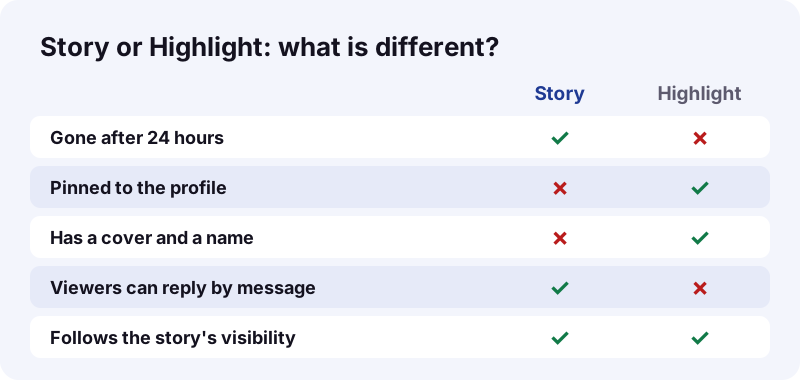
| Story | Highlight | Regular post | |
|---|---|---|---|
| How long it stays | 24 hours | Until removed | Until deleted |
| Where you find it | Profile ring, inbox, feeds | Row on the profile | Profile grid, feeds |
| How viewers respond | Message or emoji | Same as the story | Like, comment, share |
| Best tool here | This page | This page | Video downloader |
Saving a photo carousel instead of a story? The slideshow downloader grabs every image of a photo post in one go.
Will the creator know you saved their TikTok story?
Our tool does not use your account, so the download itself is not tied to you. But if you watched the story in the app to copy the link, you are already on the viewer list.
“Keep in mind that people can see you viewed their Story even if your account is private or your profile view history is turned off.”
Story owners see a total view count and the accounts that watched. That is about viewing, not saving. For the full picture of what creators can and cannot see, read can you see who saved your TikTok.
Which stories can you not save?
Anything that is not public. If TikTok does not serve the file to a logged-out visitor, we cannot get it. There is no trick around that, and we do not try.
- Stories from private accounts.
- Stories shared with a limited audience only.
- Expired stories, after the 24 hours.
- Deleted stories.
- Stories that are blocked in the server's region.
- Drafts, which only their owner can see.
TikTok's public vs private account page says people cannot download posts from a private account, and cannot add them to their own stories.
Does the creator's download setting matter?
It decides whether the TikTok app shows a Save button. Inside the app, if you see no Save option, the creator turned downloads off.
TikTok's Manage video downloads page adds two details: accounts that are private or belong to users under 16 have downloads off by default, and they cannot turn it on.
Our rule is simple. If a creator does not want copies around, respect it. Save your own stories freely, and ask before you reuse anyone else's.
How do you keep your own stories?
Turn on Save to device before you post, or add the story to a Highlight. Both are built into TikTok. Our tool is the backup for a public story you forgot to save.
- Before posting, open More options on the Post screen and turn on Save to device.
- After posting, open your profile, tap Create Story Highlights and pick stories from your archive.
- Give the Highlight a cover and a name, then publish it.
- Missed both? Paste your public story link here before it expires.
These steps come from TikTok's Download content and Stories help pages. They name the Save to device switch and the Story archive.
What about HD, file size and formats?
The HD copy, when TikTok has one, is often H.265 (HEVC). It looks sharper and weighs less than older H.264 files, but a few old players cannot open it. If yours fails, pick the plain MP4.
| File | Plays on | When to pick it |
|---|---|---|
| MP4 (standard) | Every phone, PC and editor | You want it to just work |
| HD MP4 (often HEVC) | iOS 11+ and macOS High Sierra+, plus newer players | You want the sharpest copy |
| M4A / MP3 audio | Any music player | You only need the sound |
| Photos | Any device | It was a photo story |
Apple's HEIF and HEVC guide explains that HEVC, also known as H.265, gives better compression than H.264 while keeping the same visual quality. Background on the codec is on Wikipedia.
Which browsers and devices work?
Any current browser on any device. The page is plain HTML with a small script, so there is no plug-in, no extension and nothing to update.
| Device | Browser we suggest | Where the file lands |
|---|---|---|
| iPhone or iPad | Safari | Files app, Downloads |
| Android phone | Chrome or the maker's browser | Files app, Downloads |
| Windows PC | Edge, Chrome or Firefox | Downloads folder |
| Mac | Safari or Chrome | Downloads folder |
Do you need the TikTok app at all?
Only to copy the link, and even that is optional. On a computer you can open tiktok.com, play the story and copy the address. The download itself happens in the browser.
Does it work on slow mobile data?
Yes. The page itself is light, and the file comes straight from TikTok's CDN. The audio alone is tiny: a 15-second sound is about 0.25 MB. If the video stalls, wait for a better signal and tap the file again within the hour.
What can you do with a saved story?
Watch it offline, keep it as a reference, or back up your own work. Those are the everyday uses, and none of them involve posting someone else's clip as yours.
- Keep a how-to. A cooking step, a makeup trick or a repair tip you want to see again next week.
- Back up your own story. You forgot to switch on Save to device, and the clip is still live.
- Watch on a plane. No signal, no problem, once the MP4 is on your phone.
- Share with permission. The creator said yes, so you can credit them in a group chat or a slide.
- Pull the audio. Keep a voice note or a song snippet as M4A.
Want to keep a whole profile's worth of posts instead? Paste each post link into the main video downloader; it handles regular videos the same way.
Can you edit a saved story?
The MP4 opens in any editor: the Photos app on iPhone, the gallery editor on Android, or whatever editor you already use on a computer. Trim, crop or mute it for your own use. If you publish the result, the copyright questions above still apply.
Why won't a story download?
Most often, the story expired, was deleted, or is not public. Check that the link still opens in a browser where you are logged out.
| What you see | Likely cause | What to try |
|---|---|---|
| Link not found | Story expired or deleted | Nothing to do; it is gone |
| Private content | Private account or limited audience | Ask the creator for the file |
| Download link dead | More than 1 hour passed | Paste the story link again |
| Video will not play | Old player and HEVC file | Pick the standard MP4 |
| File not in Photos | Browser saved it to Files | Open Files or Downloads |
Does a copied story link go stale?
The link keeps working as long as the story is live. After 24 hours it points to nothing, so copy and paste in the same sitting.
Is it OK to save someone's TikTok story?
Saving a public story to watch later is one thing. Reposting it, editing it into your own video or selling it is another, and needs the creator's permission or a solid legal reason.
“Fair use is a legal doctrine that promotes freedom of expression by permitting the unlicensed use of copyright-protected works in certain circumstances.”
The Copyright Office lists four factors courts weigh, including the purpose of the use and its effect on the market. When in doubt, ask. See our terms and DMCA page for how we handle takedowns.
What does Tiktokioo.com keep about you?
Nothing that identifies you. We do not ask for a login and we do not store the files. They come from TikTok's own CDN, and the links expire after 1 hour.
- No account, no email, no TikTok password.
- No copy of the story kept on our server.
- The same tool works for regular TikTok videos, sounds and photo slideshows.
TikTok is big: it reported 1 billion users in September 2021, according to Wikipedia. Plenty of those stories are worth keeping. Our privacy policy has the details.
Frequently asked questions
How do I use the TikTok story saver?
Open the public story, tap Share and Copy link, paste the link into the box on this page and tap Download. Then pick the MP4, the photos or the audio.
Is this story saver free?
Yes. There is no fee, no sign-up and no limit on public stories. You only need a browser.
How long does a TikTok story stay up?
24 hours, per TikTok Help, unless the creator deletes it sooner or pins it to a Highlight.
Can I save a story after it expired?
No. Once the 24 hours are over, TikTok no longer serves the file, so there is nothing to fetch. If the creator saved it as a Highlight, you can save it from there.
Does the creator get notified when I save their story?
Our tool does not use your TikTok account, so the save is not linked to you. Watching the story in the app does put you on the viewer list, even with a private account.
Can I save stories from a private account?
No. Private stories are not served to the public, and we only fetch public content.
Where does the story go on my iPhone?
Safari saves it in the Files app, under Browse, iCloud Drive, Downloads. Open it, tap Share and choose Save Video to add it to Photos.
Can I save just the music from a story?
Yes. Pick the audio file in the results, or use the TikTok to MP3 page. A 15-second sound is about 0.25 MB.
Why is the HD story file not playing?
The HD copy is often H.265 (HEVC). Some older players cannot decode it. Download the standard MP4 instead.
Is Tiktokioo.com part of TikTok?
No. Tiktokioo.com is an independent tool and is not affiliated with tiktokio.com, TikTok or ByteDance.
Sources
- TikTok Stories — TikTok Help Center
- Watching Stories on TikTok — TikTok Help Center
- Choosing between a private or public account — TikTok Help Center
- Manage video downloads — TikTok Help Center
- Download content — TikTok Help Center
- Where to find downloads on your iPhone or iPad — Apple Support
- Using HEIF or HEVC media on Apple devices — Apple Support
- Find & delete files on Android — Android Help
- File Explorer in Windows — Microsoft Support
- Fair Use — U.S. Copyright Office