Download a TikTok video on a Mac
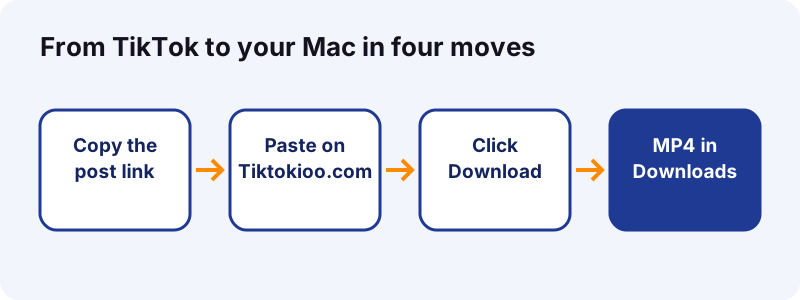
- Copy the TikTok link. Open the post on tiktok.com and copy the address bar with Command-C, or use Share, Copy link on your phone.
- Paste it on Tiktokioo.com. In Safari or Chrome on your Mac, paste the link into the box and click Download.
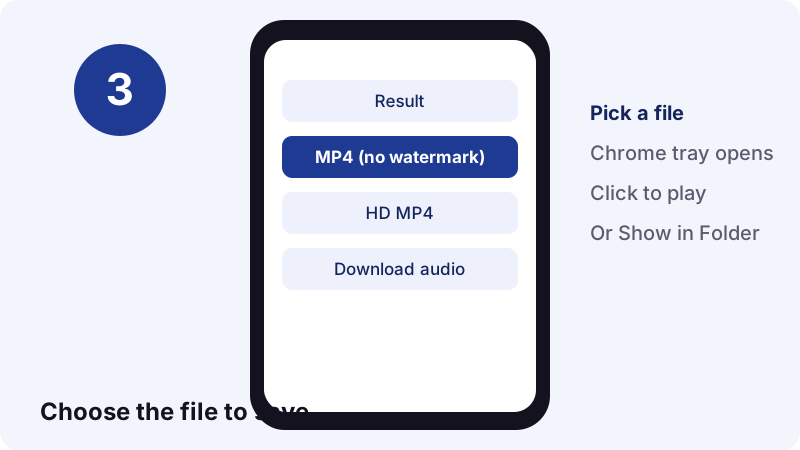
- Pick the file. Click Download MP4 (no watermark), or Download HD MP4 for the sharpest copy.
- Open it from Downloads. Find the MP4 in the Finder under Downloads, then play it in QuickTime Player or drag it into Photos.
What is the quickest way to save TikTok videos on a Mac?
Copy the post's link, paste it into the box at the top of this page and click Download. Your browser then saves an MP4 in the Downloads folder. That is the whole job, and it needs no app, no extension and no TikTok login.
This guide covers saving TikTok videos on Mac computers from start to finish: Safari and Chrome, the Finder, the HEVC question, the Photos app, AirDrop from an iPhone and quick trims in QuickTime Player. Every Mac step below comes from Apple's Safari guide, Google's Chrome Help and other official pages, linked in the sources.
Tiktokioo.com's TikTok video downloader reads a public post in 0.6 to 1.8 seconds in our tests, then hands your browser the file straight from TikTok's own CDN. We keep no copy, and each download link stops working after one hour.
What does your Mac need before you start?
To download TikTok videos on Mac computers you need very little: a browser you already have, a few megabytes of free space and the link to a public post. Any Mac that runs macOS High Sierra 10.13 or later can also play the HD files, because that is the release where Apple added HEVC support.
| Item | Why it matters | Already on your Mac? |
|---|---|---|
| Safari or Chrome | Opens the downloader and saves the MP4 | Safari, yes; Chrome is a free install |
| Finder | Where you find, rename and move the file | Yes |
| macOS High Sierra 10.13+ | Needed to play H.265 (HEVC) HD files | Any recent Mac |
| QuickTime Player | Plays, trims and converts the video | Yes |
| Photos | Optional home for the clip in your library | Yes |
| A public TikTok link | Private, deleted and region-blocked posts cannot be read | Copy it from TikTok |
- No paid converter app.
- No browser extension asking to read every site you visit.
- No TikTok account. You never sign in on Tiktokioo.com.
How do you copy a TikTok link on a Mac?
Open the post on tiktok.com, click the address bar and press Command-C. The full address, with the video number at the end, is now on your clipboard. If you are on your phone instead, use TikTok's Share button and pick Copy link, then send that link to your Mac.

Which link formats work?
- Full links such as tiktok.com/@name/video/1234… from the address bar.
- Short share links that start with vm.tiktok.com or vt.tiktok.com.
- Photo posts: the same link format, and the result lists every image.
- Profile pages, search pages and the For You feed do not point to one post, so they will not work.
Tip: open one post per browser tab. When the address bar shows /video/ followed by a long number, you have the right link.
How do you download a TikTok in Safari on macOS?
To save TikTok videos on Mac with Safari, paste the link on Tiktokioo.com, click Download, then click Download MP4 (no watermark). Safari saves the file without asking where, because by default it uses your Downloads folder.
- Open Safari and go to tiktokioo.com, or stay on this page and use the box at the top.
- Click the link box and press Command-V, or click Paste.
- Click Download. The result appears in about a second.
- Click Download MP4 (no watermark) for the copy that plays everywhere, or Download HD MP4 for the sharpest one.
- If Safari asks whether to allow downloads from the site, click Allow.

Apple's guide also covers links Safari opens instead of saving: Control-click the button and choose Download Linked File. If a video starts playing in a new tab, that trick saves it.
Which button should you click?
- Download MP4 (no watermark): the safe default for sharing, editing and older Macs.
- Download HD MP4: the sharpest copy, often H.265, best on a current Mac.
- Download audio: just the sound; the MP3 tool does the same job with more options.
How do you see Safari's download progress?
Click the Downloads button near the top-right corner of the Safari window. Apple notes the button is hidden while the list is empty, so it shows up only after your first file. A small magnifying glass next to each item reveals it in the Finder.
How do you download a TikTok in Chrome on a Mac?
Saving TikTok videos on Mac in Chrome follows the same three moves: paste, click Download, pick a file. Chrome shows its progress in a Download tray to the right of the address bar and saves to /Users/<username>/Downloads unless you changed it, according to Google's Chrome Help.
- Open Chrome and load the Tiktokioo.com box.
- Paste the TikTok link and click Download.
- Click the MP4 you want.
- When the Download tray opens, click the file to play it, or point at it and choose Show in Folder.
If Chrome opens the video in a tab instead of saving it, right-click the download button and choose Save Link As. Google's page lists that option for links and lets you pick the folder in the same dialog.
Does Chrome on a Mac play the HD file?
Usually, yes. Wikipedia's HEVC article lists Chrome support since version 107 (October 2022) on macOS 11 and later, on hardware that can decode it. On an older Mac, use the standard MP4 or convert the HD file as shown further down.
Where do TikTok downloads go on a Mac?
Downloaded TikTok videos on Mac go into the Downloads folder in your home folder, for both Safari and Chrome. Open a Finder window and click Downloads in the sidebar; the newest file sits at the top when you sort by Date Added.
| Place to look | How to get there | Good for |
|---|---|---|
| Finder sidebar | Click Downloads | Every file you saved |
| Safari downloads list | Downloads button, top right of Safari | The last day's Safari downloads |
| Chrome Downloads page | More menu, then Downloads | Chrome history; Remove clears the list, not the file |
| Dock | The Downloads stack next to the Trash | Quick drag into another app |
Safari removes items from its download list after one day by default. The file itself stays in the folder; only the list entry goes away.
“If you move a file or change the download location after downloading it, Safari can’t find the file.”
What if the file is not in Downloads?
- You changed the browser's download folder earlier, so check Safari or Chrome settings.
- You moved it, so search with Spotlight (Command-Space).
- The download never finished, so look for a paused item in the browser's list.
- The link expired after an hour, so paste the TikTok link into the downloader again.
So if the magnifying glass in Safari leads nowhere, the clip was moved. Search for it with Spotlight (Command-Space) by typing part of its name.
How do you change where Safari and Chrome save files?
Both browsers let you pick another folder in their settings. Pointing downloads at a folder called TikTok keeps clips out of the general mess and makes them easy to back up.
| Browser | Where the setting lives | Option to choose |
|---|---|---|
| Safari | Safari > Settings > General | File download location pop-up menu |
| Safari | Safari > Settings > General | Remove download list items (after one day, by default) |
| Chrome | More > Settings > Downloads | Change, to pick a new default folder |
| Chrome | More > Settings > Downloads | Ask where to save each file before downloading |
The Chrome option to ask each time is handy if you save TikTok videos on a Mac for different projects. Safari has no per-file prompt, so choose a folder and move files afterward.
Why is the HD file H.265, and will a Mac play it?
TikTok often stores its sharpest copy in H.265, also called HEVC, because it packs the same picture into fewer megabytes. A Mac on macOS High Sierra 10.13 or later can play it in QuickTime Player, Safari and Photos.
“HEIF and HEVC offer better compression than JPEG and H.264, so they use less storage space on your devices and iCloud Photos, while preserving the same visual quality.”
What do the numbers say about HEVC?
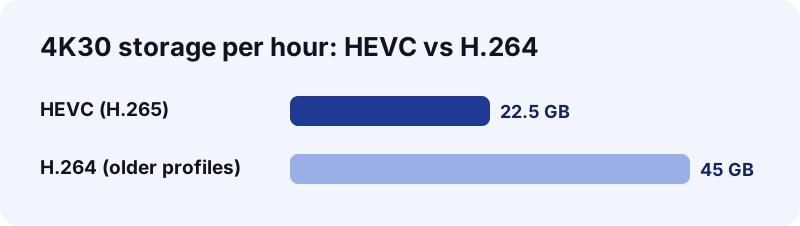
The numbers back that up. The HEVC standard was published in 2013, and Wikipedia's article states it can reach 25% to 50% better compression than H.264 at the same quality. For 4K at 30 frames per second it cites about 22.5 GB per hour with HEVC against 45 GB with older H.264 profiles.
| File on the result screen | Typical codec | Plays on |
|---|---|---|
| Download MP4 (no watermark) | H.264 | Practically any Mac, TV or editor |
| Download HD MP4 | Often H.265 (HEVC) | macOS 10.13+; Safari 11+; Chrome 107+ on macOS 11+ |
| Download audio | M4A sound | Music, QuickTime, any player |
Most HD TikTok videos on Mac models from the last few years play with no extra software. Not sure which to pick? Start with the standard MP4 if the clip is going to an older device or a picky editor. Take the HD copy when you want the best picture on a current Mac.
How do you turn an HEVC TikTok into a file that plays everywhere?
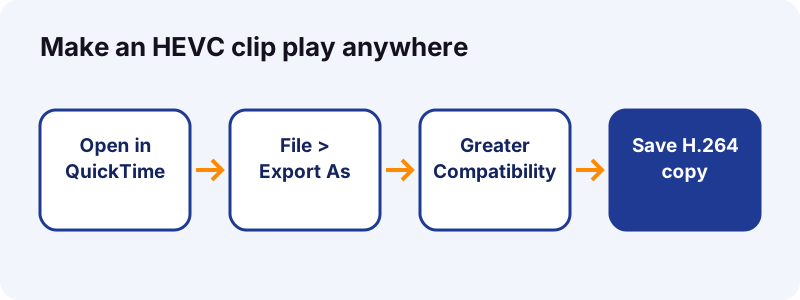
Use QuickTime Player's File > Export As and switch to Greater Compatibility (H.264), or Control-click the file in the Finder and pick Services > Encode Selected Video Files. Both are built into macOS, per Apple's HEVC support page.
Do you need to convert at all?
- No, if the clip stays on a Mac, iPhone or iPad with current software.
- Yes, if it goes to an old Windows PC, an older smart TV or an editor that rejects HEVC.
- Maybe: if in doubt, download the standard MP4 from the video downloader instead of converting.
Convert with QuickTime Player
- Double-click the HD MP4 so it opens in QuickTime Player.
- Choose File > Export As and a resolution.
- In the dialog, change the pop-up menu from Smaller File Size (HEVC) to Greater Compatibility (H.264). If you see an HEVC checkbox instead, clear it.
- Click Save.
Convert straight from the Finder
Select the file, Control-click it and choose Services > Encode Selected Video Files. In the Encode Media window, pick an H.264 option from the Settings menu. This route is faster when you have several clips.
Expect the H.264 copy to be bigger than the HEVC one. That is the trade the codec makes, not a mistake.
How do you add a downloaded TikTok to the Photos app on a Mac?
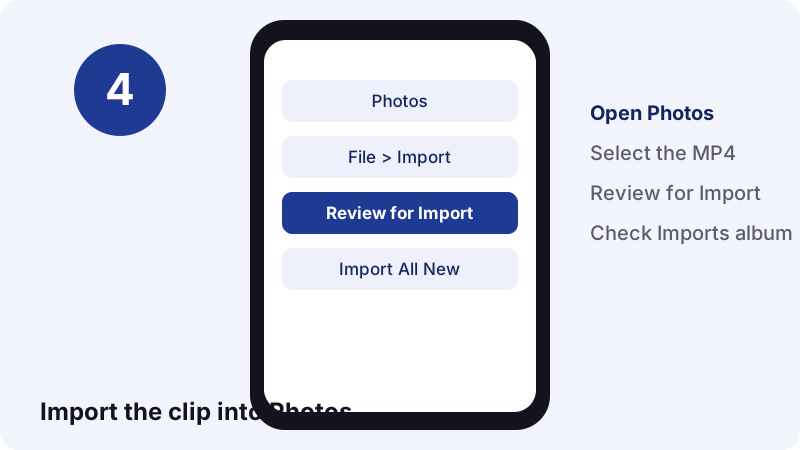
Drag the MP4 from the Finder onto the Photos window or onto the Photos icon in the Dock. Apple's Photos guide confirms both, and adds that dragging a whole folder creates an album with the folder's name.
- Open Photos.
- Choose File > Import and select the TikTok files.
- Click Review for Import, then pick an album from the Album pop-up menu if you want one.
- Click Import All New Photos, or select a few and import only those.
Should you keep the file in Downloads too?
No need. Once Photos imports a clip it keeps its own copy, so you can delete the one in Downloads to save space. Slideshow images from the photo downloader work the same way.
Imported clips show up in the Imports album in the sidebar. If you use iCloud Photos, those TikTok videos on Mac then sync to your iPhone, so this is also a tidy way to get a clip from Mac to phone.
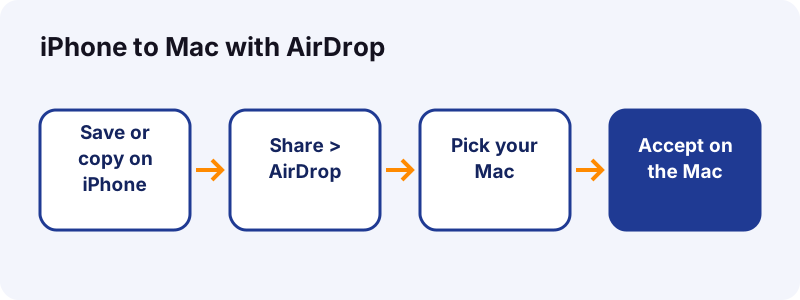
Can you AirDrop a TikTok from your iPhone to your Mac?
Yes, two ways. Send the post's link from iPhone to Mac and download it there, or download the video on the iPhone first and AirDrop the MP4. Both devices need Wi-Fi and Bluetooth on and must be close to each other.
Route 1: AirDrop the link, download on the Mac
- In TikTok on the iPhone, tap Share, then Copy link.
- Paste the link into Notes or Messages, then share that note or message with AirDrop to your Mac.
- On the Mac, copy the link and paste it into Tiktokioo.com.
Route 2: AirDrop the finished video
- Save the clip on the iPhone first with the Tiktokioo.com box in Safari.
- Open the file, tap the Share button, then tap AirDrop.
- Pick your Mac under the list of nearby devices. On the Mac, click Accept.
Apple explains that items sent between devices signed in to the same Apple Account are accepted automatically. On a Mac, many received items land in the Downloads folder, and for photos you may get a choice to open them in Photos instead.
Not seeing your Mac? On the receiving side, set AirDrop to Contacts Only or Everyone for 10 Minutes. Apple notes the 10-minute setting switches back on its own.
How do you trim a downloaded TikTok in QuickTime Player?
Open the clip, choose Edit > Trim, drag the yellow handles around the part you want, then click Trim. Everything outside the handles is cut. Apple's QuickTime guide says to click and hold a handle to see single frames for a precise edit.
- Keep just the punchline of a long video before you send it to a friend.
- Remove a dead first second before dropping the clip into a slideshow.
After trimming, choose File > Save or Export As to keep a new copy. The original download in your Downloads folder stays untouched if you save under a new name.
How do you save only the sound or the photos from a TikTok?
Use the matching tool. The TikTok to MP3 converter keeps only the audio, and the slideshow downloader saves each image of a photo post as its own file.
| What you want | Tool to use | What lands in Downloads |
|---|---|---|
| The video | Video downloader | MP4, plus HD MP4 when TikTok has one |
| The sound | TikTok to MP3 | An audio file; a 15-second sound is about 0.25 MB as M4A |
| Slideshow pictures | Slideshow downloader | One image file per photo |
| A public story | Story saver | The story video or image |
How do you save a public story on a Mac?
Paste the story link into the TikTok story saver and click Download. Stories do not stay on a profile for long, so save one while it is still visible.
On a Mac, the audio file opens in the Music app or QuickTime Player. Photos from a slideshow import into the Photos app exactly like the video, with the drag or File > Import method above.
Is screen recording a TikTok on a Mac a good idea?
It works, but the result is worse. Press Shift-Command-5 to open the Screenshot toolbar, pick a recording mode and click Record. You capture the player controls, any pop-ups and whatever resolution your screen shows, not the file TikTok stored.
Apple's screen recording page adds two details worth knowing. Recordings save to the desktop by default, named Screen Recording [date] at [time].mov. And on macOS 27 or later you can choose Include System Audio; earlier versions record a microphone, not the sound playing on the Mac.
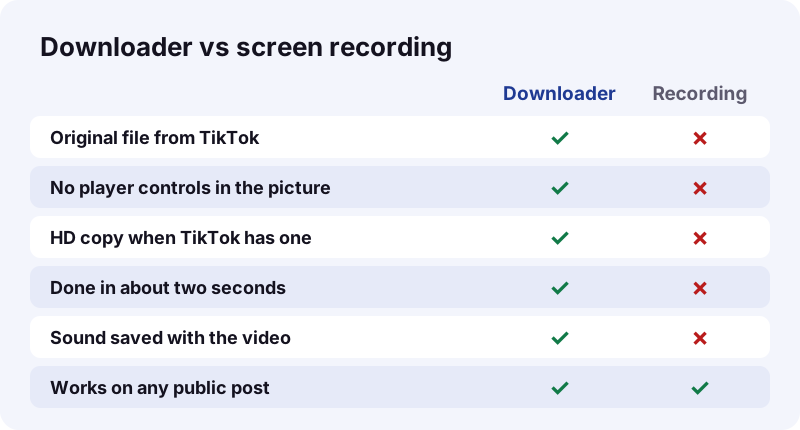
Use recording only for content that has no download option, such as your own live stream replay, and still respect the creator's rights.
Which way to save TikTok videos on a Mac is best?
For quality and speed, the TikTok downloader wins: it saves the original file rather than a copy of your screen. TikTok's own Save video button lives in the mobile app, and only appears when the creator allows downloads.
| Method | Quality | Time | Watermark | Works if creator blocks saving? |
|---|---|---|---|---|
| Tiktokioo.com in Safari or Chrome | Original file, HD when served | About 1–2 seconds to read the post | No (MP4 without watermark) | Only if TikTok still serves the file |
| TikTok app Save video, then AirDrop | TikTok's saved copy | Under a minute | Yes | No |
| Screen recording | Screen resolution, re-encoded | Length of the clip | Shows whatever is on screen | Yes, but think about copyright |
“If you don't have the option to save a video, this means the creator doesn't allow it.”
When does each method make sense?
- Use the downloader for any public post you want as a clean file.
- Use TikTok's Save video on your phone when the button is there and you do not mind the watermark.
- Use screen recording only as a last resort, for your own content.
That line from TikTok is a good rule of thumb for the downloader too: if TikTok does not serve the file, we cannot get it.
Why won't a TikTok download on my Mac?
Most failures come from the post, not the Mac: it is private, deleted, blocked in your region or still a draft. The rest are browser details, such as a paused download or a link that expired after an hour.
| What you see | Likely cause | Fix |
|---|---|---|
| "We could not read that post" | Private, deleted or region-blocked post | Check the link opens in a private window |
| Video plays in a tab | Browser opened the file instead of saving | Safari: Control-click, Download Linked File. Chrome: Save Link As |
| Download stalls in Safari | Download paused | Open the downloads list and click resume |
| Link worked earlier, not now | Download links expire after 1 hour | Paste the TikTok link again |
| HD file shows a black screen | Old macOS without HEVC | Use the standard MP4 or update macOS |
| File won't open after saving | Damaged or incomplete download | Delete it and download again |
Is it the post or the Mac?
- Open the TikTok link in a private Safari window. If TikTok itself shows an error, the post is the problem.
- Try a second public post. If that one works, the first post is restricted.
- If no post works in Safari, try Chrome, or the other way around.
Apple's Safari guide gives the same last tip: if a file seems corrupted, delete it and download again. If several posts fail in a row, tell us through the contact page with one of the links.
Is it legal to download TikTok videos on a Mac?
Saving your own posts is fine, and so is keeping a public video for personal offline viewing where the creator allows it. Re-uploading someone else's clip as your own is not. The device makes no difference: the same rules apply on a Mac as on a phone.
What is generally fine, and what is not?
- Save your own content, or content you have permission to reuse.
- Credit the creator when you share a clip.
- Commentary, teaching and news reporting can count as fair use in the US, but it is judged case by case on four factors (see the US Copyright Office's fair use index).
- If you own a video and want it blocked on this site, use our DMCA page.
Tiktokioo.com is an independent tool and is not affiliated with tiktokio.com, TikTok or ByteDance. We do not store videos; see the privacy policy for what happens to a pasted link.
How do you keep TikTok downloads organized on a Mac?
Keeping TikTok videos on Mac tidy takes three habits: give each clip a clear name, put it in one folder and use Finder tags. TikTok files arrive with long numeric names, so a 10-second rename now saves a long search later.
A simple folder plan
- Create a TikTok folder and set it as the browser's download location.
- Rename files with the creator and topic, for example creator-recipe-pasta.mp4.
- Add a Finder tag such as "To edit" or "Keep"; the Mac User Guide notes you can click a tag in the sidebar to list every file with it.
- Drag finished clips into Photos and delete the copies in Downloads to free space.
- Back up the folder with Time Machine or iCloud Drive like any other files.
Want more? Read how to check who saved your TikTok, how to undo a repost or what TikTok gifts are worth. Or go straight back to the TikTok video downloader and save the next clip.
Frequently asked questions
How do I download TikTok videos on a Mac without an app?
Copy the post link, paste it into Tiktokioo.com in Safari or Chrome and click Download, then Download MP4 (no watermark). The file goes to your Downloads folder.
Where are downloaded TikTok videos on Mac computers?
In the Downloads folder of your home folder. Open a Finder window and click Downloads in the sidebar. Chrome's default path is /Users/your-name/Downloads.
Why won't my Mac play the HD TikTok file?
The HD copy is often H.265 (HEVC). Macs need macOS High Sierra 10.13 or later to play it. On an older Mac, use the standard MP4, or convert with QuickTime Player's Export As and Greater Compatibility (H.264).
Can I save TikTok videos on a Mac without the watermark?
Yes. The Download MP4 (no watermark) button gives the version without the TikTok overlay when TikTok serves it for that public post.
Does TikTok's website have a download button on Mac?
TikTok's Help Center describes Save video in the TikTok app, and says the option is missing when the creator does not allow downloads. On a Mac, a browser-based downloader is the simple route for public posts.
How do I move a TikTok from my iPhone to my Mac?
Save it on the iPhone, open the file, tap Share, then AirDrop, and pick your Mac. Or AirDrop just the link and download it on the Mac. Many received items land in the Mac's Downloads folder.
How do I put a downloaded TikTok into the Photos app on a Mac?
Drag the MP4 from the Finder onto the Photos window or its Dock icon, or choose File > Import and Review for Import. It appears in the Imports album.
Can I download a private TikTok on my Mac?
No. Tiktokioo.com only reads public posts. Private, deleted, region-blocked posts and drafts cannot be downloaded, on a Mac or anywhere else.
Is the download link permanent?
No. Each download link expires after one hour. The file you already saved stays on your Mac; to download again later, paste the TikTok link again.
Can I get only the sound of a TikTok on a Mac?
Yes. Use the TikTok to MP3 tool. A 15-second sound is about 0.25 MB as an M4A file and opens in Music or QuickTime Player.
Guides
Video Downloader — Paste a link, get the MP4 without the TikTok logo.
Sources
- Download items from the web using Safari on Mac — Apple Support
- Download a file (Computer) — Google Chrome Help
- Using HEIF or HEVC media on Apple devices — Apple Support
- Use AirDrop to send items to nearby devices on Mac — Apple Support
- How to use AirDrop on your iPhone or iPad — Apple Support
- Import from storage devices and DVDs in Photos on Mac — Apple Support
- Trim a movie or clip in QuickTime Player on Mac — Apple Support
- How to record the screen on Mac — Apple Support
- Download content — TikTok Help Center
- High Efficiency Video Coding — Wikipedia