Check what a TikTok gift costs where you live
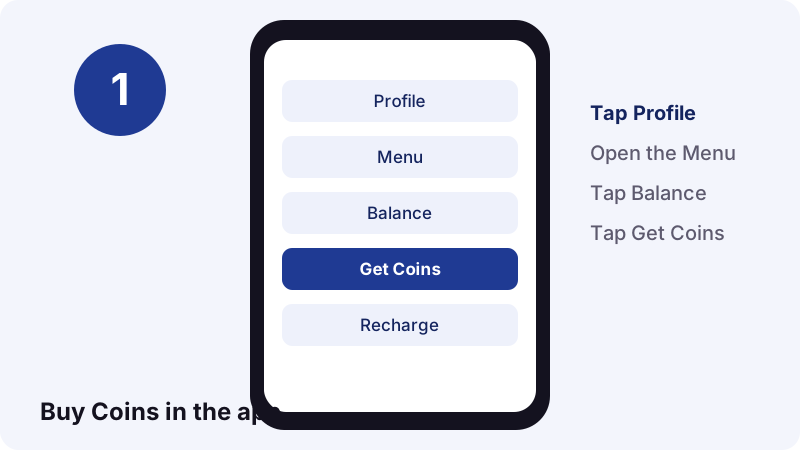
- Open Balance. In the TikTok app, tap Profile, tap the Menu button, then tap Balance.
- Look at the Coin packages. Tap Get Coins. Each package shows a number of Coins and a price in your local currency. Do not buy yet.
- Work out the price per Coin. Divide the package price by the number of Coins in it. Bigger packages can give a different price per Coin.
- Find the gift's Coin cost. In a LIVE, tap the Gift button. The number of Coins each gift needs is shown below it.
- Multiply. Coins for the gift times your price per Coin is what that gift costs you, before any bank or card fees.
How much are TikTok gifts worth? The short answer
TikTok gifts cost a set number of Coins, and the app shows that number below each gift. What those Coins cost in real money is not fixed: TikTok's U.S. policy says the price per Coin changes with how many you buy and where you buy them.
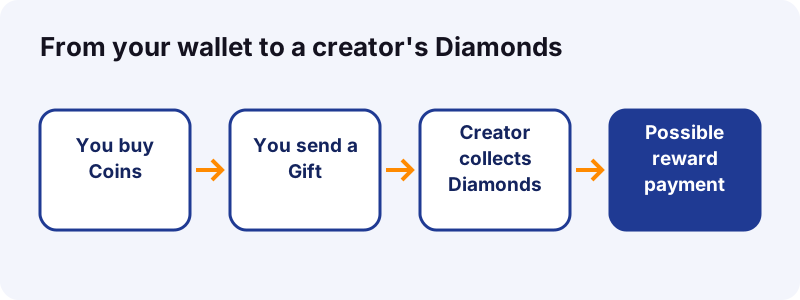
So there is no single dollar value that holds for everyone. A gift's real cost is its Coin price multiplied by what you paid per Coin, plus any card or currency fees. For the creator, the gift becomes Diamonds, which are a popularity score rather than cash.
- Viewer side: Coins needed per gift, shown in the app.
- Your price per Coin: depends on package size, country, app store or website.
- Creator side: Diamonds, then a possible reward payment set by TikTok.
What are TikTok gifts?
TikTok gifts are virtual items you activate with Coins to react to a creator's content. TikTok Help says you can send them while browsing your feeds or during a LIVE. They appear on screen, and the creator and other viewers can see who sent them.
TikTok describes gifting as a way to show appreciation. A July 2026 post on TikTok's own LIVE Creator Networks blog calls gifting “the new ‘Like’” for fans. That is a useful way to think about them: a paid, very visible reaction.
- They exist only inside TikTok.
- They are paid for with Coins, never directly with cash.
- They are used up the moment you send them.
- Your username and the gift details are shown publicly.
How do Coins, Gifts and Diamonds fit together?
Coins are what you buy. Gifts are what you spend Coins on. Diamonds are what the creator collects when gifts arrive in their LIVE. Each step is a separate virtual item with its own rules in TikTok's Virtual Items Policy.
| Item | Who has it | How you get it | What it is for |
|---|---|---|---|
| Coins | Viewers | Bought in the app, on the website or with a gift card | Activating Gifts, Promote, Star Comments |
| Gifts | Viewers send them | Activated with Coins | Reacting to a LIVE or a post |
| Diamonds | Creators | Collected from Gifts, missions and campaigns | Measuring popularity; one factor in rewards |
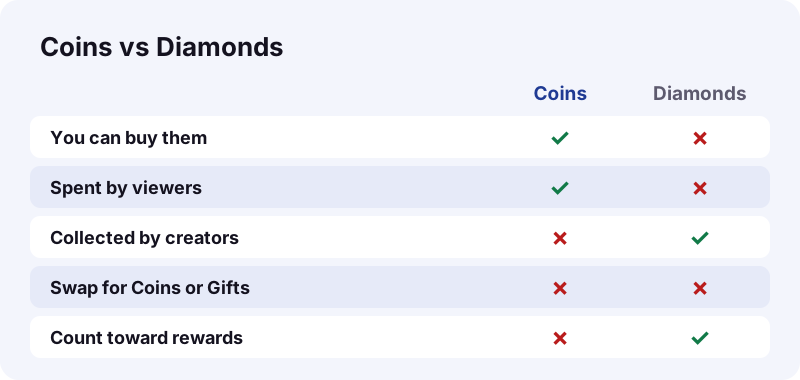
TikTok's older global policy adds two firm rules: users cannot purchase Diamonds, and Diamonds cannot be exchanged for Coins or Gifts. The road only runs one way.
Why is there no official dollar price list for TikTok gifts?
Because the price of a Coin is not one number. TikTok sets packages by country and sales channel, and app stores add their own pricing. TikTok's policy states this plainly.
“When you buy Coins, the cost per Coin differs depending on how many you buy and where you buy them.”
TikTok also says the Coin cost of a gift depends on the type of gift, and that it can change exchange rates at its discretion. Any table that lists exact dollar prices for TikTok gifts is a snapshot from one place and one moment, and may already be out of date.
We do not publish a gift price table on purpose. We could not source exact figures from TikTok, and prices vary by region and platform and change over time.
How do you check what a gift costs in your country?
Look at two screens in your own app: the Coin packages under Balance, and the gift panel in a LIVE. Between them you have everything you need, in your currency, without spending anything.
- Tap Profile, then the Menu button, then Balance.
- Tap Get Coins and note a package: its Coins and its price.
- Back out without paying.
- Join any LIVE that has gifting turned on and tap the Gift button.
- Read the Coin number under the gift you are curious about.
If you do not see a Gift button in a LIVE, TikTok Help says gifting is not available for that LIVE.
How do you work out the real cost of one gift?
Divide what a Coin package costs by the Coins in it, then multiply by the gift's Coin price. That gives you the value of the gift in your money, for the package you picked.
| Step | What you calculate | Where the number comes from |
|---|---|---|
| A | Package price ÷ Coins in package = price per Coin | Balance, Get Coins |
| B | Gift's Coin cost | Number under the gift in a LIVE |
| C | A × B = what the gift costs you | Your own calculation |
| D | Add card or currency fees, if any | Your bank or payment provider |
Run step A for two package sizes. Because TikTok says the cost per Coin differs by how many you buy, you may get two different answers. TikTok's U.S. policy also warns that your payment provider may add currency exchange or foreign transaction fees.
Where can you buy TikTok Coins?
TikTok Help lists three channels: in the app through your app store, directly on the TikTok website in supported countries, and with TikTok gift cards redeemed on the website in supported countries.
| Channel | How it works | Availability | Refund route |
|---|---|---|---|
| App Store (iPhone) | In-app purchase, billed by Apple | Where Coins are offered | Contact Apple |
| Google Play (Android) | In-app purchase, billed by Google | Where Coins are offered | TikTok: Report a problem |
| TikTok website | tiktok.com/coin, third-party payment provider | Supported countries only | Not refundable, unless law requires |
| Gift card | Redeem the PIN at tiktok.com/coin/redeem | Not in all regions | Gift card terms apply |
The U.S. policy also names Amazon's Appstore as a possible app store. Which channel is cheapest where you live is something only the price screens can tell you.
How do you buy Coins inside the TikTok app?
Go to Profile, Menu, Balance, Get Coins, pick a package and tap Recharge. Payment is handled by the App Store or Google Play, using the method linked to that store account.
- Tap Profile at the bottom.
- Tap the Menu button at the top and select Balance.
- Tap Get Coins and choose a package.
- Tap Recharge and finish the purchase in your app store.
You can also recharge from inside a LIVE: tap the Gift button, then tap Recharge at the bottom of the gift panel. It is the same purchase, just started from a different screen.
How do you buy Coins on the TikTok website?
Open www.tiktok.com/coin in a browser, choose a package, click Recharge and pay with your preferred method. TikTok Help says this route exists only in supported countries.
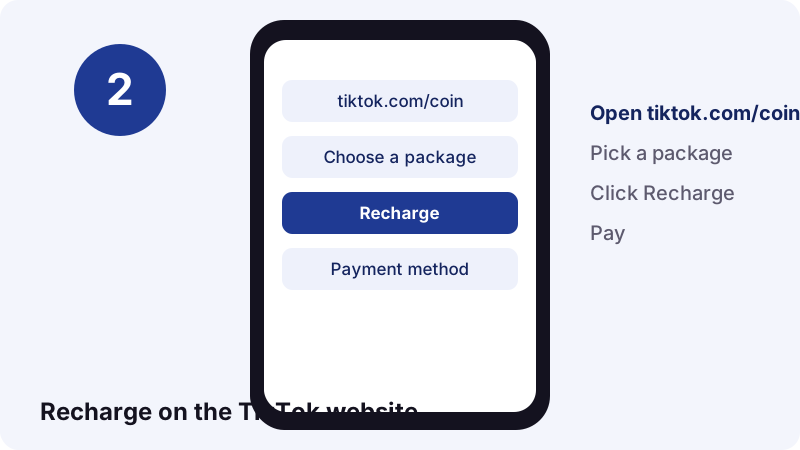
On the website, a third-party payment provider handles the charge, and TikTok's policy says the total price is shown at the point of purchase, taxes included. Gift card PINs are redeemed on a separate page, tiktok.com/coin/redeem, where that option is offered.
How do you send a gift during a TikTok LIVE?
Tap the Gift button at the bottom of the LIVE, choose a gift, recharge if your balance is too low, then tap Send below the gift. The gift's Coin value is taken from your balance at once.
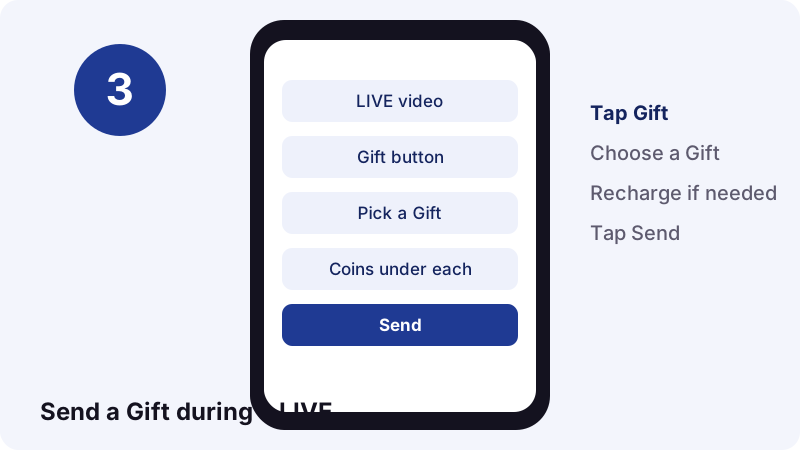
- During a LIVE, tap the Gift button.
- Choose the gift you want to send.
- Tap Recharge if you need more Coins.
- Tap Send below the gift.
Check the Coin number before you tap Send. Gifts are consumed the moment they are activated, which is why TikTok does not refund them.
Can you send TikTok gifts outside of a LIVE?
Yes, in some cases. TikTok Help says gifts can be sent while browsing your feeds as well as during a LIVE, and that Coins activate gifts “on posts you see in your feed.” Where it is offered, the gift option appears on the post itself.
Coins also pay for things that are not gifts. TikTok lists Promote, its paid boost for posts, and Star Comments. The U.S. policy adds Heart Mes as another virtual item activated with Coins. All of them draw from the same balance.
- Gifts in a LIVE.
- Gifts on posts in your feed, where available.
- Promote, to boost your own content.
- Star Comments.
Who can send and receive TikTok gifts?
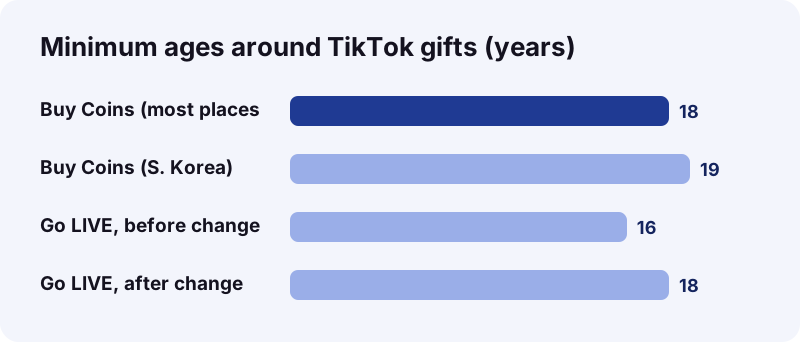
You must be at least 18 (19 in South Korea) to buy Coins and send gifts, and gifts work only in select countries. Creators must also be 18 or older, live where gifts are available, be eligible to go LIVE and keep their account in good standing.
- Government, politician and political party accounts cannot receive or send gifts.
- Certain other public interest accounts are excluded too.
- Unusual or suspicious transactions can get gifting or Coin purchases restricted for a while.
The age rule has a history. According to Wikipedia's TikTok article, TikTok raised the minimum age for livestreaming from 16 to 18 after a BBC News investigation found accounts going live from refugee camps to ask for digital donations.
What does a creator actually get when you send a gift?
The creator collects Diamonds, not money. TikTok uses Diamonds to measure a creator's popularity, and the type and number of gifts in a LIVE feed into that count. Legally, the gift is not a payment from you to them.
“By gifting, you are not transferring money, Coins, or anything of value to other users on the Platform.”
Any money a creator receives comes from TikTok as a reward, under separate rules. TikTok's global policy says gifts are converted into Diamonds at a rate TikTok determines from time to time. It does not publish that rate.
How do Diamonds turn into a creator payout?
Diamonds can make a creator eligible for a reward payment, but they do not guarantee one. TikTok's U.S. Rewards Policy lists several factors it weighs for rewards from LIVE content, and Diamonds are only one of them.
- Popularity, measured in Diamonds collected.
- LIVE duration.
- New unique followers gained while LIVE.
- Viewer engagement.
- Number of days the creator has gone LIVE.
- League or ranking.
- Quality and safety of the LIVE content.
TikTok's U.S. Rewards Policy (updated January 22, 2026) says reward payments are calculated in U.S. dollars. The app may show an estimate in your local currency, and converting the payment can cost a fee.
Payment goes to a “Preferred Account” in the creator's legal name, such as a bank account or PayPal. Minimum and maximum limits and transaction fees may apply.
How much of a gift's value does the creator keep?
TikTok does not publish a fixed split. Its policies describe a conversion rate it sets itself and a reward that depends on many factors, so there is no official percentage you can apply to a gift.
Wikipedia notes that in one BBC investigation TikTok was reported to take as much as a 70% commission on some LIVE donations, a figure the company disputed. Treat any “creators keep X%” claim online with care: it is an estimate, not a TikTok rule.
| Question | What TikTok's rules say |
|---|---|
| Fixed Coin-to-Diamond rate? | Set by TikTok from time to time |
| Diamonds guarantee money? | No, they do not automatically entitle a reward |
| Currency of payouts | Calculated in USD, shown in local currency |
| Fees | Transaction and conversion fees may apply |
| Can TikTok cut Diamonds? | Yes, for rule breaches, in proportion |
Where do creators see their Diamonds?
In the app, go to Profile, Menu, Balance, then LIVE rewards. TikTok Help says that is where the Diamonds balance lives, and Help & feedback on the same page covers questions about it.
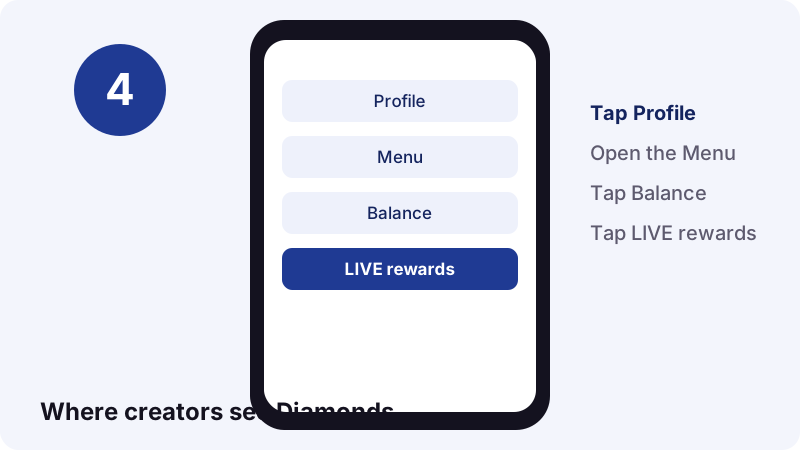
Diamonds can also come from missions and campaigns, not only from gifts, so the total may be higher than your gift count alone suggests. To collect them at all, TikTok requires you to live in a country where Diamonds are available and be at least 18.
Can you get a refund for TikTok Coins or gifts?
Gifts: no, never, because they are used up on activation. Coins: it depends on how you bought them. App store purchases follow the store's process; Coins bought directly from TikTok are not refundable unless the law requires it.
| You bought Coins via | How to ask for a refund | Good to know |
|---|---|---|
| Apple App Store | Apple's refund request page (reportaproblem.apple.com) | Apple says to wait 24 to 48 hours for an update |
| Google Play | Report a problem in TikTok's Profile settings | Google's refund policies vary by item and country |
| TikTok website | Not refundable | Unless the Coins are defective or law requires |
| Already spent on a gift | Not refundable | Gifts are consumed on activation |
When a refund goes through, TikTok deducts those Coins from your balance. TikTok Help says a refund is only possible if your balance still holds enough Coins to cover it.
How do you see what you spent on TikTok gifts?
Open Balance, tap Coins, tap the History icon, then filter by Gifts sent. TikTok keeps a record of every Coin you bought and how you used it, and Transactions shows what you paid.
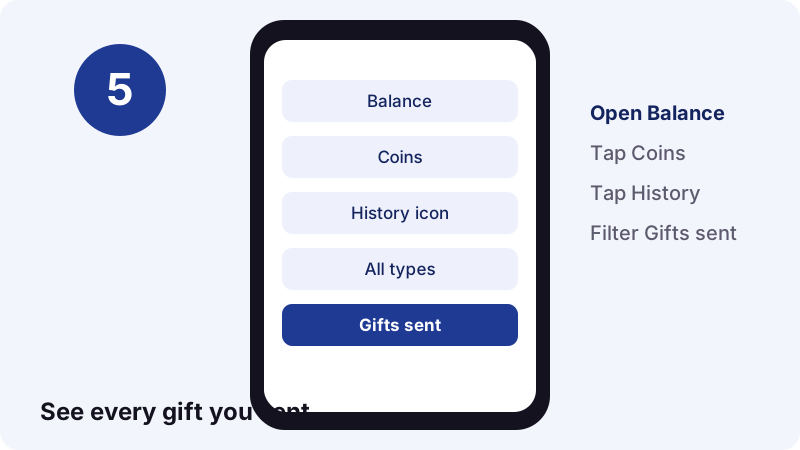
- Gifts sent: Balance, Coins, History icon, All types, Gifts sent.
- Refunds: Balance, Transactions, Refund filter.
- Payouts (creators): Balance, Transactions, Payout filter.
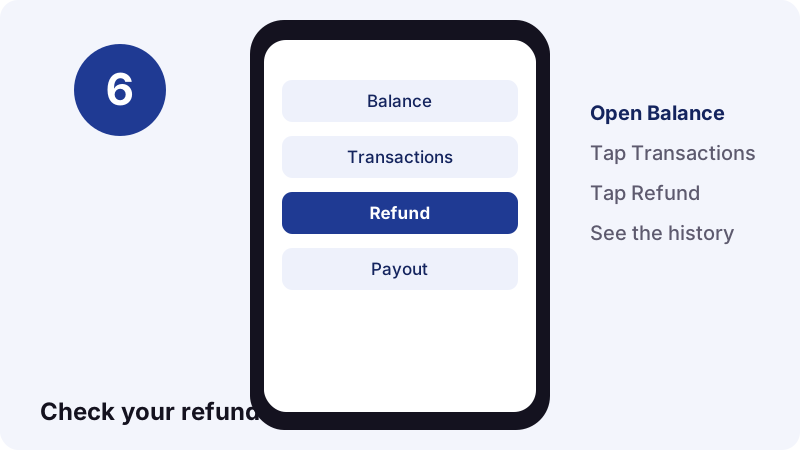
If you are trying to keep LIVE spending in check, check the Gifts sent list once a week. It is the most honest answer to how much TikTok gifts are worth to you.
Can you sell, trade or cash out TikTok Coins?
No. TikTok's U.S. policy says virtual items cannot be exchanged for cash or used as currency, and cannot be bought from, sold to or traded with other users. Only TikTok sells them.
That makes “cheap Coins” sellers and “free gift” generators a red flag. Coins moved outside TikTok's rules can be voided, and breaking the rules can cost you your account. If your account is closed, unused Coins are lost with it unless the law says otherwise.
- Never give your TikTok login to a Coin seller.
- Buy only in the app, on tiktok.com/coin or with an official TikTok gift card.
- Spend Coins you already have before you close an account.
Why won't my Coin purchase go through?
Most failures come from the payment method, a VPN, an outdated app or a weak connection. TikTok Help suggests checking these in order before contacting Apple or Google.
- Make sure a valid payment method is linked to your App Store or Google Play account.
- Turn off any VPN.
- Update TikTok to the latest version.
- Check that your connection is stable.
- Still stuck? Contact Apple Support or the Google Help Center.
If you paid but no Coins arrived, restart the app and refresh Balance. If they still do not show, send TikTok feedback with a screenshot of your receipt showing the order ID, the amount and the payment time.
Are the TikTok gift price lists online accurate?
They can be a rough guide at best. Lists of TikTok gifts with dollar values are usually built from one country's Coin price on one date. Since TikTok says the cost per Coin differs by package and channel, those figures may not match your screen.
- Check the date the list was made.
- Check which country and which store it used.
- Compare it with the Coin number under the gift in your own app.
- Remember that TikTok can change the Coin-to-Gift exchange rate.
The only price that counts is the one in your app at the moment you tap Send.
How can creators keep a copy of their best LIVE moments?
If you post a highlight from your LIVE as a normal public video, you can save that video as an MP4 with the Tiktokioo.com downloader. It is a handy way to keep your own gift moments, thank-you clips and shout-outs.
- Save the clip as an MP4 without the watermark with the free TikTok video downloader.
- Pull the sound out as audio with TikTok to MP3.
- Keep a public story after 24 hours with the story saver.
- Save every picture of a photo post with the slideshow downloader.
Tiktokioo.com works only with public posts; if TikTok does not serve the file, we cannot get it. Save your own content or content you have permission to reuse. For more on what others can see, read can you see who saved your TikTok, or learn how to delete a repost. Using a Mac? See TikTok downloads on Mac.
Frequently asked questions
How much are TikTok gifts worth in dollars?
There is no single dollar value. Each gift costs a set number of Coins, shown under it in the app, and TikTok says the cost per Coin differs by how many you buy and where you buy them.
How do I find the price of a gift in my currency?
Open Balance, then Get Coins, and divide a package's price by its Coins. Multiply that by the Coin number under the gift in a LIVE.
Do creators get the money I spend on TikTok gifts?
Not directly. TikTok says gifting does not transfer anything of value to other users. Creators collect Diamonds, which may make them eligible for a reward payment from TikTok.
What percentage of a gift does TikTok keep?
TikTok does not publish one. Its policies say Diamonds are converted at a rate it sets and rewards depend on several factors.
Can I get my Coins back after sending a gift?
No. TikTok's policy says gifts are consumed immediately on activation and are not refundable in any circumstances.
How old do you have to be to send TikTok gifts?
At least 18, or 19 in South Korea, according to TikTok Help.
Is it cheaper to buy Coins on the website?
It can differ, since TikTok says the cost per Coin depends on where you buy. Compare the website and in-app prices for your country before you pay.
Can I turn Diamonds back into Coins?
No. TikTok's policy says Diamonds cannot be exchanged for Coins or Gifts, and users cannot buy Diamonds.
Why can't I see the Gift button in a LIVE?
TikTok Help says that if you do not see Gifts, gifting is not available for that LIVE. It may also be unavailable in your country or for your age.
Can I save a video from my own LIVE?
If you post the clip as a public video, you can save it as an MP4 with the Tiktokioo.com downloader. Private posts and drafts cannot be saved.
Are free TikTok Coins generators real?
No. TikTok says Coins come only from TikTok and cannot be bought from or traded with other users. Sites promising free Coins put your account at risk.
Guides
Video Downloader — Paste a link, get the MP4 without the TikTok logo.
Sources
- Gifts and Coins — TikTok Help Center
- Send a Gift during a LIVE on TikTok — TikTok Help Center
- Diamonds — TikTok Help Center
- Virtual Items Policy (U.S.), updated January 22, 2026 — TikTok
- Virtual Items Policy (global) — TikTok
- Rewards Policy (U.S.), updated January 22, 2026 — TikTok
- What Are TikTok LIVE Gifts and Why Do Viewers Send Them? — TikTok LIVE Creator Networks
- Request a refund for apps or content that you bought from Apple — Apple Support
- Learn about Google Play refund policies — Google Play Help
- TikTok — Wikipedia